
Description

In August 2025, we discovered a campaign targeting individuals in Turkey with a new Android banking Trojan we dubbed "Frogblight". Initially, the malware was disguised as an app for accessing court case files via an official government webpage. Later, more universal disguises appeared, such as the Chrome browser.
Frogblight can use official government websites as an intermediary step to steal banking credentials. Moreover, it has spyware functionality, such as capabilities to collect SMS messages, a list of installed apps on the device and device filesystem information. It can also send arbitrary SMS messages.
Another interesting characteristic of Frogblight is that we've seen it updated with new features throughout September. This may indicate that a feature-rich malware app for Android is being developed, which might be distributed under the MaaS model.
This threat is detected by Kaspersky products as HEUR:Trojan-Banker.AndroidOS.Frogblight.*, HEUR:Trojan-Banker.AndroidOS.Agent.eq, HEUR:Trojan-Banker.AndroidOS.Agent.ep, HEUR:Trojan-Spy.AndroidOS.SmsThief.de.
## Technical details
### Background
While performing an analysis of mobile malware we receive from various sources, we discovered several samples belonging to a new malware family. Although these samples appeared to be still under development, they already contained a lot of functionality that allowed this family to be classified as a banking Trojan. As new versions of this malware continued to appear, we began monitoring its development. Moreover, we managed to discover its control panel and based on the "fr0g" name shown there, we dubbed this family "Frogblight".
### Initial infection
We believe that smishing is one of the distribution vectors for Frogblight, and that the users had to install the malware themselves. On the internet, we found complaints from Turkish users about phishing SMS messages convincing users that they were involved in a court case and containing links to download malware. versions of Frogblight, including the very first ones, were disguised as an app for accessing court case files via an official government webpage and were named the same as the files for downloading from the links mentioned above.
While looking for online mentions of the names used by the malware, we discovered one of the phishing websites distributing Frogblight, which disguises itself as a website for viewing a court file.

The phishing website distributing Frogblight
We were able to open the admin panel of this website, where it was possible to view statistics on Frogblight malware downloads. However, the counter had not been fully implemented and the threat actor could only view the statistics for their own downloads.
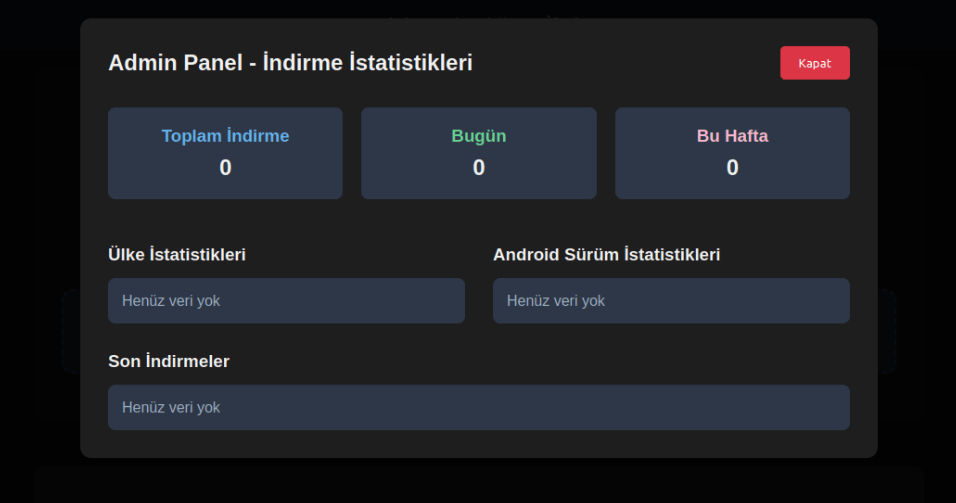
The admin panel interface of the website from which Frogblight is downloaded
Additionally, we found the source code of this phishing website available in a public GitHub repository. Judging by its description, it is adapted for fast deployment to Vercel, a platform for hosting web apps.
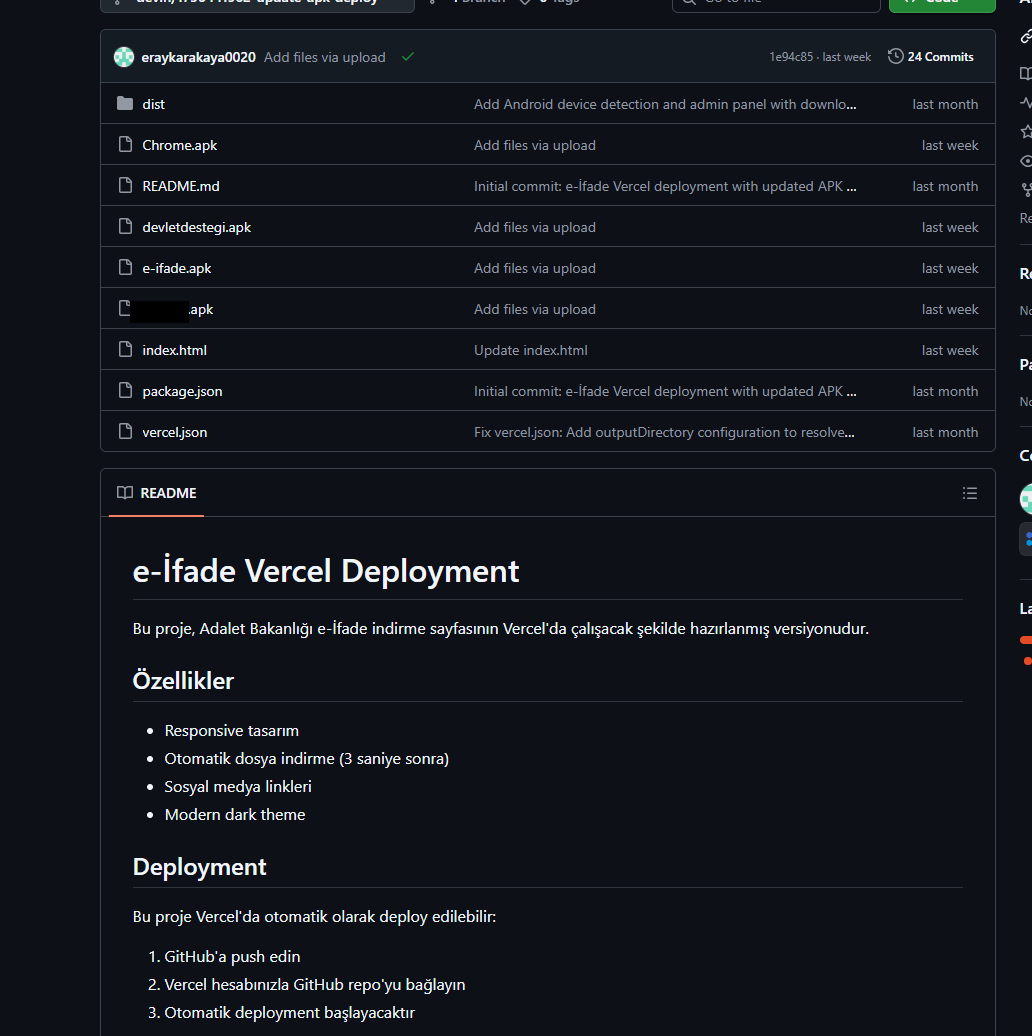
The GitHub repository with the phishing website source code
### App features
As already mentioned, Frogblight was initially disguised as an app for accessing court case files via an official government webpage. Let's look at one of the samples using this disguise (`9dac23203c12abd60d03e3d26d372253`). For analysis, we selected an early sample, but not the first one discovered, in order to demonstrate more complete Frogblight functionality.
After starting, the app prompts the victim to grant permissions to send and read SMS messages, and to read from and write to the device's storage, allegedly needed to show a court file related to the user.
The full list of declared permissions in the app manifest file is shown below:
* MANAGE_EXTERNAL_STORAGE
* READ_EXTERNAL_STORAGE
* WRITE_EXTERNAL_STORAGE
* READ_SMS
* RECEIVE_SMS
* SEND_SMS
* WRITE_SMS
* RECEIVE_BOOT_COMPLETED
* INTERNET
* QUERY_ALL_PACKAGES
* BIND_ACCESSIBILITY_SERVICE
* DISABLE_KEYGUARD
* FOREGROUND_SERVICE
* FOREGROUND_SERVICE_DATA_SYNC
* POST_NOTIFICATIONS
* QUICKBOOT_POWERON
* RECEIVE_MMS
* RECEIVE_WAP_PUSH
* REQUEST_IGNORE_BATTERY_OPTIMIZATIONS
* SCHEDULE_EXACT_ALARM
* USE_EXACT_ALARM
* VIBRATE
* WAKE_LOCK
* ACCESS_NETWORK_STATE
* READ_PHONE_STATE
After all required permissions are granted, the malware opens the official government webpage for accessing court case files in WebView, prompting the victim to sign in. There are different sign-in options, one of them via online banking. If the user chooses this method, they are prompted to click on a bank whose online banking app they use and fill out the sign-in form on the bank's official website. This is what Frogblight is after, so it waits two seconds, then opens the online banking sign-in method regardless of the user's choice. For each webpage that has finished loading in WebView, Frogblight injects JavaScript code allowing it to capture user input and send it to the C2 via a REST API.
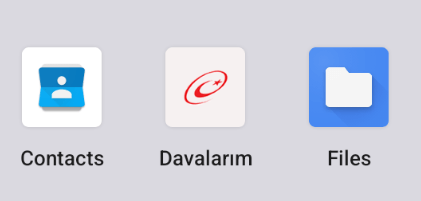
The malware also changes its label to "Davalarım" if the Android version is newer than 12; otherwise it hides the icon.
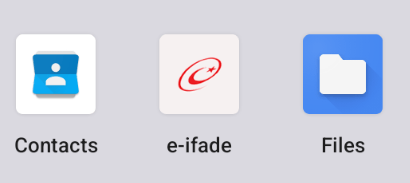 | 
---|---
**_The app icon before (left) and after launching (right)_**
In the sample we review in this section, Frogblight uses a REST API for C2 communication, implemented using the Retrofit library. The malicious app pings the C2 server every two seconds in foreground, and if no error is returned, it calls the REST API client methods `fetchOutbox` and getFileCommands. Other methods are called when specific events occur, for example, after the device screen is turned on, the `com.capcuttup.refresh.PersistentService` foreground service is launched, or an SMS is received. The full list of all REST API client methods with parameters and descriptions is shown below.
**REST API client method** | **Description** | **Parameters**
---|---|---
fetchOutbox | Request message content to be sent via SMS or displayed in a notification | device_id: unique Android device ID
ackOutbox | Send the results of processing a message received after calling the API method fetchOutbox | device_id: unique Android device ID
msg_id: message ID
status: message processing status
error: message processing error
getAllPackages | Request the names of app packages whose launch should open a website in WebView to capture user input data | action: same as the API method name
getPackageUrl | Request the website URL that will be opened in WebView when the app with the specified package name is launched | action: same as the API method name
package: the package name of the target app
getFileCommands | Request commands for file operations Available commands:
● download: upload the target file to the C2
● generate_thumbnails: generate thumbnails from the image files in the target directory and upload them to the C2
● list: send information about all files in the target directory to the C2
● thumbnail: generate a thumbnail from the target image file and upload it to the C2 | device_id: unique Android device ID
pingDevice | Check the C2 connection | device_id: unique Android device ID
reportHijackSuccess | Send captured user input data from the website opened in a WebView when the app with the specified package name is launched | action: same as the API method name
package: the package name of the target app
data: captured user input data
saveAppList | Send information about the apps installed on the device | device_id: unique Android device ID app_list: a list of apps installed on the device
app_count: a count of apps installed on the device
saveInjection | Send captured user input data from the website opened in a WebView. If it was not opened following the launch of the target app, the app_name parameter is determined based on the opened URL | device_id: unique Android device ID app_name: the package name of the target app
form_data: captured user input data
savePermission | Unused but presumably needed for sending information about permissions | device_id: unique Android device ID permission_type: permission type
status: permission status
sendSms | Send information about an SMS message from the device | device_id: unique Android device ID sender: the sender's/recipient's phone number
message: message text
timestamp: received/sent time
type: message type (inbox/sent)
sendTelegramMessage | Send captured user input data from the webpages opened by Frogblight in WebView | device_id: unique Android device ID
url: website URL
title: website page title
input_type: the type of user input data
input_value: user input data
final_value: user input data with additional information
timestamp: the time of data capture
ip_address: user IP address
sms_permission: whether SMS permission is granted
file_manager_permission: whether file access permission is granted
updateDevice | Send information about the device | device_id: unique Android device ID
model: device manufacturer and model
android_version: Android version
phone_number: user phone number
battery: current battery level
charging: device charging status
screen_status: screen on/off
ip_address: user IP address
sms_permission: whether SMS permission is granted
file_manager_permission: whether file access permission is granted
updatePermissionStatus | Send information about permissions | device_id: unique Android device ID
permission_type: permission type
status: permission status
timestamp: current time
uploadBatchThumbnails | Upload thumbnails to the C2 | device_id: unique Android device ID
thumbnails: thumbnails
uploadFile | Upload a file to the C2 | device_id: unique Android device ID
file_path: file path
download_id: the file ID on the C2
The file itself is sent as an unnamed parameter
uploadFileList | Send information about all files in the target directory | device_id: unique Android device ID
path: directory path
file_list: information about the files in the target directory
uploadFileListLog | Send information about all files in the target directory to an endpoint different from uploadFileList | device_id: unique Android device ID
path: directory path
file_list: information about the files in the target directory
uploadThumbnailLog | Unused but presumably needed for uploading thumbnails to an endpoint different from uploadBatchThumbnails | device_id: unique Android device ID
thumbnails: thumbnails
#### Remote device control, persistence, and protection against deletion
The app includes several classes to provide the threat actor with remote access to the infected device, gain persistence, and protect the malicious app from being deleted.
* `capcuttup.refresh.AccessibilityAutoClickService`
This is intended to prevent removal of the app and to open websites specified by the threat actor in WebView upon target apps startup. It is present in the sample we review, but is no longer in use and deleted in further versions.
* `capcuttup.refresh.PersistentService`
This is a service whose main purpose is to interact with the C2 and to make malicious tasks persistent.
* `capcuttup.refresh.BootReceiver`
This is a broadcast receiver responsible for setting up the persistence mechanisms, such as job scheduling and setting alarms, after device boot completion.
### Further development
In later versions, new functionality was added, and some of the more recent Frogblight variants disguised themselves as the Chrome browser. Let's look at one of the fake Chrome samples (`d7d15e02a9cd94c8ab00c043aef55aff`).
In this sample, new REST API client methods have been added for interacting with the C2.
**REST API client method** | **Description** | **Parameters**
---|---|---
getContactCommands | Get commands to perform actions with contacts
Available commands:
● ADD_CONTACT: add a contact to the user device
● DELETE_CONTACT: delete a contact from the user device
● EDIT_CONTACT: edit a contact on the user device | device_id: unique Android device ID
sendCallLogs | Send call logs to the C2 | device_id: unique Android device ID
call_logs: call log data
sendNotificationLogs | Send notifications log to the C2. Not fully implemented in this sample, and as of the time of writing this report, we hadn't seen any samples with a full-fledged implementation of this API method | action: same as the API method name
notifications: notification log data
Also, the threat actor had implemented a custom input method for recording keystrokes to a file using the `com.puzzlesnap.quickgame.CustomKeyboardService` service.
Another Frogblight sample we observed trying to avoid emulators and using geofencing techniques is `115fbdc312edd4696d6330a62c181f35`. In this sample, Frogblight checks the environment (for example, device model) and shuts down if it detects an emulator or if the device is located in the United States.
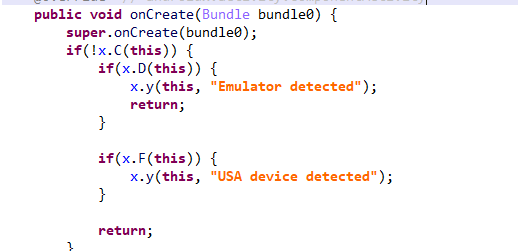
Part of the code responsible for avoiding Frogblight running in an undesirable environment
Later on, the threat actor decided to start using a web socket instead of the REST API. Let's see an example of this in one of the recent samples (`08a3b1fb2d1abbdbdd60feb8411a12c7`). This sample is disguised as an app for receiving social support via an official government webpage. The feature set of this sample is very similar to the previous ones, with several new capabilities added. Commands are transmitted over a web socket using the JSON format. A command template is shown below:
{
"id": <command ID>,
"command_type": <command name>
"command_data": <command data>
}
It is also worth noting that some commands in this version share the same meaning but have different structures, and the functionality of certain commands has not been fully implemented yet. This indicates that Frogblight was under active development at the time of our research, and since no its activity was noticed after September, it is possible that the malware is being finalized to a fully operational state before continuing to infect users' devices. A full list of commands with their parameters and description is shown below:
**Command** | **Description** | **Parameters**
---|---|---
connect | Send a registration message to the C2 | –
connection_success | Send various information, such as call logs, to the C2; start pinging the C2 and requesting commands | –
auth_error | Log info about an invalid login key to the Android log system | –
pong_device | _Does nothing_ | –
commands_list | Execute commands | List of commands
sms_send_command | Send an arbitrary SMS message | recipient: message destination
message: message text
msg_id: message ID
bulk_sms_command | Send an arbitrary SMS message to multiple recipients | recipients: message destinations
message: message text
get_contacts_command | Send all contacts to the C2 | –
get_app_list_command | Send information about the apps installed on the device to the C2 | –
get_files_command | Send information about all files in certain directories to the C2 | –
get_call_logs_command | Send call logs to the C2 | –
get_notifications_command | Send a notifications log to the C2. This is not fully implemented in the sample at hand, and as of the time of writing this report, we hadn't seen any samples with a full-fledged implementation of this command | –
take_screenshot_command | Take a screenshot. This is not fully implemented in the sample at hand, and as of the time of writing this report, we hadn't seen any samples with a full-fledged implementation of this command | –
update_device | Send registration message to the C2 | –
new_webview_data | Collect WebView data. This is not fully implemented in the sample at hand, and as of the time of writing this report, we hadn't seen any samples with a full-fledged implementation of this command | –
new_injection | Inject code. This is not fully implemented in the sample at hand, and as of the time of writing this report, we hadn't seen any samples with a full-fledged implementation of this command | code: injected code
target_app: presumably the package name of the target app
add_contact_command | Add a contact to the user device | name: contact name
phone: contact phone
email: contact email
contact_add | Add a contact to the user device | display_name: contact name
phone_number: contact phone
email: contact email
contact_delete | Delete a contact from the user device | phone_number: contact phone
contact_edit | Edit a contact on the user device | display_name: new contact name
phone_number: contact phone
email: new contact email
contact_list | Send all contacts to the C2 | –
file_list | Send information about all files in the specified directory to the C2 | path: directory path
file_download | Upload the specified file to the C2 | file_path: file path
download_id: an ID that is received with the command and sent back to the C2 along with the requested file. Most likely, this is used to organize data on the C2
file_thumbnail | Generate a thumbnail from the target image file and upload it to the C2 | file_path: image file path
file_thumbnails | Generate thumbnails from the image files in the target directory and upload them to the C2 | folder_path: directory path
health_check | Send information about the current device state: battery level, screen state, and so on | –
message_list_request | Send all SMS messages to the C2 | –
notification_send | Show an arbitrary notification | title: notification title
message: notification message
app_name: notification subtext
package_list_response | Save the target package names | packages: a list of all target package names.
Each list element contains:
package_name: target package name
active: whether targeting is active
delete_contact_command | Delete a contact from the user device. This is not fully implemented in the sample at hand, and as of the time of writing this report, we hadn't seen any samples with a full-fledged implementation of this command | contact_id: contact ID
name: contact name
file_upload_command | Upload specified file to the C2. This is not fully implemented in the sample at hand, and as of the time of writing this report, we hadn't seen any samples with a full-fledged implementation of this command | file_path: file path
file_name: file name
file_download_command | Download file to user device. This is not fully implemented in the sample at hand, and as of the time of writing this report, we hadn't seen any samples with a full-fledged implementation of this command | file_url: the URL of the file to download
download_path: download path
download_file_command | Download file to user device. This is not fully implemented in the sample at hand, and as of the time of writing this report, we hadn't seen any samples with a full-fledged implementation of this command | file_url: the URL of the file to download
download_path: downloading path
get_permissions_command | Send a registration message to the C2, including info about specific permissions | –
health_check_command | Send information about the current device state, such as battery level, screen state, and so on | –
connect_error | Log info about connection errors to the Android log system | A list of errors
reconnect | Send a registration message to the C2 | –
disconnect | Stop pinging the C2 and requesting commands from it | –
Authentication via WebSocket takes place using a special key.

The part of the code responsible for the WebSocket authentication logic
At the IP address to which the WebSocket connection was made, the Frogblight web panel was accessible, which accepted the authentication key mentioned above. Since only samples using the same key as the webpanel login are controllable through it, we suggest that Frogblight might be distributed under the MaaS model.

The interface of the sign-in screen for the Frogblight web panel
Judging by the menu options, the threat actor can sort victims' devices by certain parameters, such as the presence of banking apps on the device, and send bulk SMS messages and perform other mass actions.
## Victims
Since some versions of Frogblight opened the Turkish government webpage to collect user-entered data on Turkish banks' websites, we assume with high confidence that it is aimed mainly at users from Turkey. Also, based on our telemetry, the majority of users attacked by Frogblight are located in that country.
## Attribution
Even though it is not possible to provide an attribution to any known threat actor based on the information available, during our analysis of the Frogblight Android malware and the search for online mentions of the names it uses, we discovered a GitHub profile containing repos with Frogblight, which had also created repos with Coper malware, distributed under the MaaS model. It is possible that this profile belongs to the attackers distributing Coper who have also started distributing Frogblight.

GitHub repositories containing Frogblight and Coper malware
Also, since the comments in the Frogblight code are written in Turkish, we believe that its developers speak this language.
## Conclusions
The new Android malware we dubbed "Frogblight" appeared recently and targets mainly users from Turkey. This is an advanced banking Trojan aimed at stealing money. It has already infected real users' devices, and it doesn't stop there, adding more and more new features in the new versions that appear. It can be made more dangerous by the fact that it may be used by attackers who already have experience distributing malware. We will continue to monitor its development.
## Indicators of Compromise
_More indicators of compromise, as well as any updates to these, are available to the customers of ourcrimeware reporting service. If you are interested, please contact [email protected]._
**APK file hashes**
8483037dcbf14ad8197e7b23b04aea34
105fa36e6f97977587a8298abc31282a
e1cd59ae3995309627b6ab3ae8071e80
115fbdc312edd4696d6330a62c181f35
08a3b1fb2d1abbdbdd60feb8411a12c7
d7d15e02a9cd94c8ab00c043aef55aff
9dac23203c12abd60d03e3d26d372253
**C2 domains**
1249124fr1241og5121.sa[.]com
froglive[.]net
**C2 IPs**
45.138.16.208[:]8080
**URL of GitHub repository with Frogblight phishing website source code**
https://github[.]com/eraykarakaya0020/e-ifade-vercel
**URL of GitHub account containing APK files of Frogblight and Coper**
https://github[.]com/Chromeapk
**Distribution URLs**
https://farketmez37[.]cfd/e-ifade.apk
https://farketmez36[.]sbs/e-ifade.apk
https://e-ifade-app-5gheb8jc.devinapps[.]com/e-ifade.apk
In August 2025, we discovered a campaign targeting individuals in Turkey with a new Android banking Trojan we dubbed "Frogblight". Initially, the malware was disguised as an app for accessing court case files via an official government webpage. Later, more universal disguises appeared, such as the Chrome browser.
Frogblight can use official government websites as an intermediary step to steal banking credentials. Moreover, it has spyware functionality, such as capabilities to collect SMS messages, a list of installed apps on the device and device filesystem information. It can also send arbitrary SMS messages.
Another interesting characteristic of Frogblight is that we've seen it updated with new features throughout September. This may indicate that a feature-rich malware app for Android is being developed, which might be distributed under the MaaS model.
This threat is detected by Kaspersky products as HEUR:Trojan-Banker.AndroidOS.Frogblight.*, HEUR:Trojan-Banker.AndroidOS.Agent.eq, HEUR:Trojan-Banker.AndroidOS.Agent.ep, HEUR:Trojan-Spy.AndroidOS.SmsThief.de.
## Technical details
### Background
While performing an analysis of mobile malware we receive from various sources, we discovered several samples belonging to a new malware family. Although these samples appeared to be still under development, they already contained a lot of functionality that allowed this family to be classified as a banking Trojan. As new versions of this malware continued to appear, we began monitoring its development. Moreover, we managed to discover its control panel and based on the "fr0g" name shown there, we dubbed this family "Frogblight".
### Initial infection
We believe that smishing is one of the distribution vectors for Frogblight, and that the users had to install the malware themselves. On the internet, we found complaints from Turkish users about phishing SMS messages convincing users that they were involved in a court case and containing links to download malware. versions of Frogblight, including the very first ones, were disguised as an app for accessing court case files via an official government webpage and were named the same as the files for downloading from the links mentioned above.
While looking for online mentions of the names used by the malware, we discovered one of the phishing websites distributing Frogblight, which disguises itself as a website for viewing a court file.

The phishing website distributing Frogblight
We were able to open the admin panel of this website, where it was possible to view statistics on Frogblight malware downloads. However, the counter had not been fully implemented and the threat actor could only view the statistics for their own downloads.

The admin panel interface of the website from which Frogblight is downloaded
Additionally, we found the source code of this phishing website available in a public GitHub repository. Judging by its description, it is adapted for fast deployment to Vercel, a platform for hosting web apps.

The GitHub repository with the phishing website source code
### App features
As already mentioned, Frogblight was initially disguised as an app for accessing court case files via an official government webpage. Let's look at one of the samples using this disguise (`9dac23203c12abd60d03e3d26d372253`). For analysis, we selected an early sample, but not the first one discovered, in order to demonstrate more complete Frogblight functionality.
After starting, the app prompts the victim to grant permissions to send and read SMS messages, and to read from and write to the device's storage, allegedly needed to show a court file related to the user.
The full list of declared permissions in the app manifest file is shown below:
* MANAGE_EXTERNAL_STORAGE
* READ_EXTERNAL_STORAGE
* WRITE_EXTERNAL_STORAGE
* READ_SMS
* RECEIVE_SMS
* SEND_SMS
* WRITE_SMS
* RECEIVE_BOOT_COMPLETED
* INTERNET
* QUERY_ALL_PACKAGES
* BIND_ACCESSIBILITY_SERVICE
* DISABLE_KEYGUARD
* FOREGROUND_SERVICE
* FOREGROUND_SERVICE_DATA_SYNC
* POST_NOTIFICATIONS
* QUICKBOOT_POWERON
* RECEIVE_MMS
* RECEIVE_WAP_PUSH
* REQUEST_IGNORE_BATTERY_OPTIMIZATIONS
* SCHEDULE_EXACT_ALARM
* USE_EXACT_ALARM
* VIBRATE
* WAKE_LOCK
* ACCESS_NETWORK_STATE
* READ_PHONE_STATE
After all required permissions are granted, the malware opens the official government webpage for accessing court case files in WebView, prompting the victim to sign in. There are different sign-in options, one of them via online banking. If the user chooses this method, they are prompted to click on a bank whose online banking app they use and fill out the sign-in form on the bank's official website. This is what Frogblight is after, so it waits two seconds, then opens the online banking sign-in method regardless of the user's choice. For each webpage that has finished loading in WebView, Frogblight injects JavaScript code allowing it to capture user input and send it to the C2 via a REST API.
The malware also changes its label to "Davalarım" if the Android version is newer than 12; otherwise it hides the icon.
 | 
---|---
**_The app icon before (left) and after launching (right)_**
In the sample we review in this section, Frogblight uses a REST API for C2 communication, implemented using the Retrofit library. The malicious app pings the C2 server every two seconds in foreground, and if no error is returned, it calls the REST API client methods `fetchOutbox` and getFileCommands. Other methods are called when specific events occur, for example, after the device screen is turned on, the `com.capcuttup.refresh.PersistentService` foreground service is launched, or an SMS is received. The full list of all REST API client methods with parameters and descriptions is shown below.
**REST API client method** | **Description** | **Parameters**
---|---|---
fetchOutbox | Request message content to be sent via SMS or displayed in a notification | device_id: unique Android device ID
ackOutbox | Send the results of processing a message received after calling the API method fetchOutbox | device_id: unique Android device ID
msg_id: message ID
status: message processing status
error: message processing error
getAllPackages | Request the names of app packages whose launch should open a website in WebView to capture user input data | action: same as the API method name
getPackageUrl | Request the website URL that will be opened in WebView when the app with the specified package name is launched | action: same as the API method name
package: the package name of the target app
getFileCommands | Request commands for file operations Available commands:
● download: upload the target file to the C2
● generate_thumbnails: generate thumbnails from the image files in the target directory and upload them to the C2
● list: send information about all files in the target directory to the C2
● thumbnail: generate a thumbnail from the target image file and upload it to the C2 | device_id: unique Android device ID
pingDevice | Check the C2 connection | device_id: unique Android device ID
reportHijackSuccess | Send captured user input data from the website opened in a WebView when the app with the specified package name is launched | action: same as the API method name
package: the package name of the target app
data: captured user input data
saveAppList | Send information about the apps installed on the device | device_id: unique Android device ID app_list: a list of apps installed on the device
app_count: a count of apps installed on the device
saveInjection | Send captured user input data from the website opened in a WebView. If it was not opened following the launch of the target app, the app_name parameter is determined based on the opened URL | device_id: unique Android device ID app_name: the package name of the target app
form_data: captured user input data
savePermission | Unused but presumably needed for sending information about permissions | device_id: unique Android device ID permission_type: permission type
status: permission status
sendSms | Send information about an SMS message from the device | device_id: unique Android device ID sender: the sender's/recipient's phone number
message: message text
timestamp: received/sent time
type: message type (inbox/sent)
sendTelegramMessage | Send captured user input data from the webpages opened by Frogblight in WebView | device_id: unique Android device ID
url: website URL
title: website page title
input_type: the type of user input data
input_value: user input data
final_value: user input data with additional information
timestamp: the time of data capture
ip_address: user IP address
sms_permission: whether SMS permission is granted
file_manager_permission: whether file access permission is granted
updateDevice | Send information about the device | device_id: unique Android device ID
model: device manufacturer and model
android_version: Android version
phone_number: user phone number
battery: current battery level
charging: device charging status
screen_status: screen on/off
ip_address: user IP address
sms_permission: whether SMS permission is granted
file_manager_permission: whether file access permission is granted
updatePermissionStatus | Send information about permissions | device_id: unique Android device ID
permission_type: permission type
status: permission status
timestamp: current time
uploadBatchThumbnails | Upload thumbnails to the C2 | device_id: unique Android device ID
thumbnails: thumbnails
uploadFile | Upload a file to the C2 | device_id: unique Android device ID
file_path: file path
download_id: the file ID on the C2
The file itself is sent as an unnamed parameter
uploadFileList | Send information about all files in the target directory | device_id: unique Android device ID
path: directory path
file_list: information about the files in the target directory
uploadFileListLog | Send information about all files in the target directory to an endpoint different from uploadFileList | device_id: unique Android device ID
path: directory path
file_list: information about the files in the target directory
uploadThumbnailLog | Unused but presumably needed for uploading thumbnails to an endpoint different from uploadBatchThumbnails | device_id: unique Android device ID
thumbnails: thumbnails
#### Remote device control, persistence, and protection against deletion
The app includes several classes to provide the threat actor with remote access to the infected device, gain persistence, and protect the malicious app from being deleted.
* `capcuttup.refresh.AccessibilityAutoClickService`
This is intended to prevent removal of the app and to open websites specified by the threat actor in WebView upon target apps startup. It is present in the sample we review, but is no longer in use and deleted in further versions.
* `capcuttup.refresh.PersistentService`
This is a service whose main purpose is to interact with the C2 and to make malicious tasks persistent.
* `capcuttup.refresh.BootReceiver`
This is a broadcast receiver responsible for setting up the persistence mechanisms, such as job scheduling and setting alarms, after device boot completion.
### Further development
In later versions, new functionality was added, and some of the more recent Frogblight variants disguised themselves as the Chrome browser. Let's look at one of the fake Chrome samples (`d7d15e02a9cd94c8ab00c043aef55aff`).
In this sample, new REST API client methods have been added for interacting with the C2.
**REST API client method** | **Description** | **Parameters**
---|---|---
getContactCommands | Get commands to perform actions with contacts
Available commands:
● ADD_CONTACT: add a contact to the user device
● DELETE_CONTACT: delete a contact from the user device
● EDIT_CONTACT: edit a contact on the user device | device_id: unique Android device ID
sendCallLogs | Send call logs to the C2 | device_id: unique Android device ID
call_logs: call log data
sendNotificationLogs | Send notifications log to the C2. Not fully implemented in this sample, and as of the time of writing this report, we hadn't seen any samples with a full-fledged implementation of this API method | action: same as the API method name
notifications: notification log data
Also, the threat actor had implemented a custom input method for recording keystrokes to a file using the `com.puzzlesnap.quickgame.CustomKeyboardService` service.
Another Frogblight sample we observed trying to avoid emulators and using geofencing techniques is `115fbdc312edd4696d6330a62c181f35`. In this sample, Frogblight checks the environment (for example, device model) and shuts down if it detects an emulator or if the device is located in the United States.

Part of the code responsible for avoiding Frogblight running in an undesirable environment
Later on, the threat actor decided to start using a web socket instead of the REST API. Let's see an example of this in one of the recent samples (`08a3b1fb2d1abbdbdd60feb8411a12c7`). This sample is disguised as an app for receiving social support via an official government webpage. The feature set of this sample is very similar to the previous ones, with several new capabilities added. Commands are transmitted over a web socket using the JSON format. A command template is shown below:
{
"id": <command ID>,
"command_type": <command name>
"command_data": <command data>
}
It is also worth noting that some commands in this version share the same meaning but have different structures, and the functionality of certain commands has not been fully implemented yet. This indicates that Frogblight was under active development at the time of our research, and since no its activity was noticed after September, it is possible that the malware is being finalized to a fully operational state before continuing to infect users' devices. A full list of commands with their parameters and description is shown below:
**Command** | **Description** | **Parameters**
---|---|---
connect | Send a registration message to the C2 | –
connection_success | Send various information, such as call logs, to the C2; start pinging the C2 and requesting commands | –
auth_error | Log info about an invalid login key to the Android log system | –
pong_device | _Does nothing_ | –
commands_list | Execute commands | List of commands
sms_send_command | Send an arbitrary SMS message | recipient: message destination
message: message text
msg_id: message ID
bulk_sms_command | Send an arbitrary SMS message to multiple recipients | recipients: message destinations
message: message text
get_contacts_command | Send all contacts to the C2 | –
get_app_list_command | Send information about the apps installed on the device to the C2 | –
get_files_command | Send information about all files in certain directories to the C2 | –
get_call_logs_command | Send call logs to the C2 | –
get_notifications_command | Send a notifications log to the C2. This is not fully implemented in the sample at hand, and as of the time of writing this report, we hadn't seen any samples with a full-fledged implementation of this command | –
take_screenshot_command | Take a screenshot. This is not fully implemented in the sample at hand, and as of the time of writing this report, we hadn't seen any samples with a full-fledged implementation of this command | –
update_device | Send registration message to the C2 | –
new_webview_data | Collect WebView data. This is not fully implemented in the sample at hand, and as of the time of writing this report, we hadn't seen any samples with a full-fledged implementation of this command | –
new_injection | Inject code. This is not fully implemented in the sample at hand, and as of the time of writing this report, we hadn't seen any samples with a full-fledged implementation of this command | code: injected code
target_app: presumably the package name of the target app
add_contact_command | Add a contact to the user device | name: contact name
phone: contact phone
email: contact email
contact_add | Add a contact to the user device | display_name: contact name
phone_number: contact phone
email: contact email
contact_delete | Delete a contact from the user device | phone_number: contact phone
contact_edit | Edit a contact on the user device | display_name: new contact name
phone_number: contact phone
email: new contact email
contact_list | Send all contacts to the C2 | –
file_list | Send information about all files in the specified directory to the C2 | path: directory path
file_download | Upload the specified file to the C2 | file_path: file path
download_id: an ID that is received with the command and sent back to the C2 along with the requested file. Most likely, this is used to organize data on the C2
file_thumbnail | Generate a thumbnail from the target image file and upload it to the C2 | file_path: image file path
file_thumbnails | Generate thumbnails from the image files in the target directory and upload them to the C2 | folder_path: directory path
health_check | Send information about the current device state: battery level, screen state, and so on | –
message_list_request | Send all SMS messages to the C2 | –
notification_send | Show an arbitrary notification | title: notification title
message: notification message
app_name: notification subtext
package_list_response | Save the target package names | packages: a list of all target package names.
Each list element contains:
package_name: target package name
active: whether targeting is active
delete_contact_command | Delete a contact from the user device. This is not fully implemented in the sample at hand, and as of the time of writing this report, we hadn't seen any samples with a full-fledged implementation of this command | contact_id: contact ID
name: contact name
file_upload_command | Upload specified file to the C2. This is not fully implemented in the sample at hand, and as of the time of writing this report, we hadn't seen any samples with a full-fledged implementation of this command | file_path: file path
file_name: file name
file_download_command | Download file to user device. This is not fully implemented in the sample at hand, and as of the time of writing this report, we hadn't seen any samples with a full-fledged implementation of this command | file_url: the URL of the file to download
download_path: download path
download_file_command | Download file to user device. This is not fully implemented in the sample at hand, and as of the time of writing this report, we hadn't seen any samples with a full-fledged implementation of this command | file_url: the URL of the file to download
download_path: downloading path
get_permissions_command | Send a registration message to the C2, including info about specific permissions | –
health_check_command | Send information about the current device state, such as battery level, screen state, and so on | –
connect_error | Log info about connection errors to the Android log system | A list of errors
reconnect | Send a registration message to the C2 | –
disconnect | Stop pinging the C2 and requesting commands from it | –
Authentication via WebSocket takes place using a special key.

The part of the code responsible for the WebSocket authentication logic
At the IP address to which the WebSocket connection was made, the Frogblight web panel was accessible, which accepted the authentication key mentioned above. Since only samples using the same key as the webpanel login are controllable through it, we suggest that Frogblight might be distributed under the MaaS model.

The interface of the sign-in screen for the Frogblight web panel
Judging by the menu options, the threat actor can sort victims' devices by certain parameters, such as the presence of banking apps on the device, and send bulk SMS messages and perform other mass actions.
## Victims
Since some versions of Frogblight opened the Turkish government webpage to collect user-entered data on Turkish banks' websites, we assume with high confidence that it is aimed mainly at users from Turkey. Also, based on our telemetry, the majority of users attacked by Frogblight are located in that country.
## Attribution
Even though it is not possible to provide an attribution to any known threat actor based on the information available, during our analysis of the Frogblight Android malware and the search for online mentions of the names it uses, we discovered a GitHub profile containing repos with Frogblight, which had also created repos with Coper malware, distributed under the MaaS model. It is possible that this profile belongs to the attackers distributing Coper who have also started distributing Frogblight.

GitHub repositories containing Frogblight and Coper malware
Also, since the comments in the Frogblight code are written in Turkish, we believe that its developers speak this language.
## Conclusions
The new Android malware we dubbed "Frogblight" appeared recently and targets mainly users from Turkey. This is an advanced banking Trojan aimed at stealing money. It has already infected real users' devices, and it doesn't stop there, adding more and more new features in the new versions that appear. It can be made more dangerous by the fact that it may be used by attackers who already have experience distributing malware. We will continue to monitor its development.
## Indicators of Compromise
_More indicators of compromise, as well as any updates to these, are available to the customers of ourcrimeware reporting service. If you are interested, please contact [email protected]._
**APK file hashes**
8483037dcbf14ad8197e7b23b04aea34
105fa36e6f97977587a8298abc31282a
e1cd59ae3995309627b6ab3ae8071e80
115fbdc312edd4696d6330a62c181f35
08a3b1fb2d1abbdbdd60feb8411a12c7
d7d15e02a9cd94c8ab00c043aef55aff
9dac23203c12abd60d03e3d26d372253
**C2 domains**
1249124fr1241og5121.sa[.]com
froglive[.]net
**C2 IPs**
45.138.16.208[:]8080
**URL of GitHub repository with Frogblight phishing website source code**
https://github[.]com/eraykarakaya0020/e-ifade-vercel
**URL of GitHub account containing APK files of Frogblight and Coper**
https://github[.]com/Chromeapk
**Distribution URLs**
https://farketmez37[.]cfd/e-ifade.apk
https://farketmez36[.]sbs/e-ifade.apk
https://e-ifade-app-5gheb8jc.devinapps[.]com/e-ifade.apk
Basic Information
ID
SECURELIST:786F74F650FAC0A9E10635C67068DA5E
Published
Dec 15, 2025 at 07:00