
Description
It starts with a simple search.
You need to set up remote access to a colleague’s computer. You do a Google search for “RustDesk download,” click one of the top results, and land on a polished website with documentation, downloads, and familiar branding.
You install the software, launch it, and everything works exactly as expected.
What you don’t see is the second program that installs alongside it—one that quietly gives attackers persistent access to your computer.
That’s exactly what we observed in a campaign using the fake domain **rustdesk[.]work**.
## The bait: a near-perfect impersonation
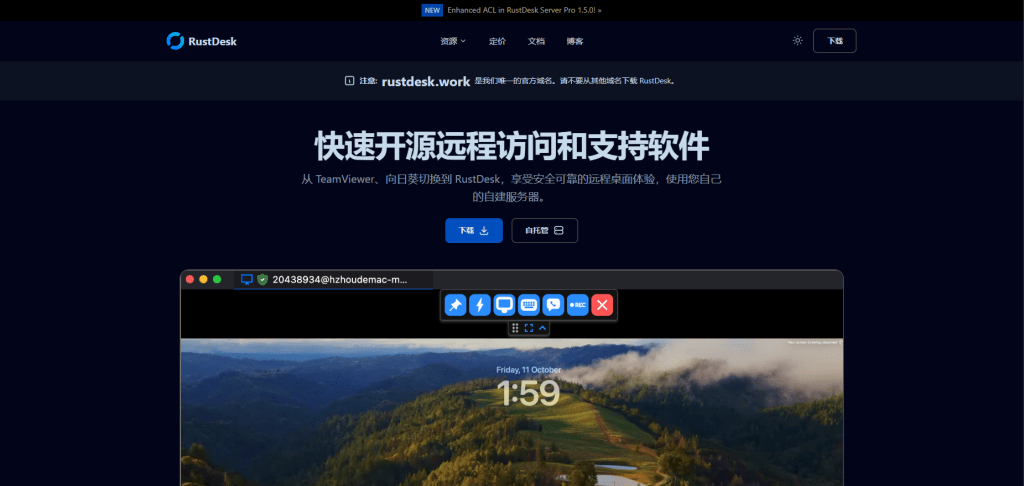
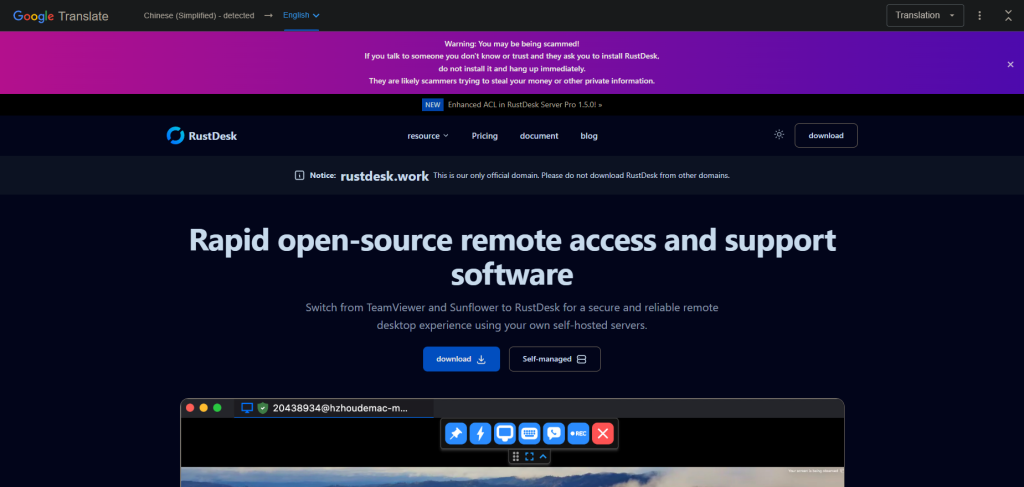
We identified a malicious website at **rustdesk[.]work** impersonating the legitimate RustDesk project, which is hosted at **rustdesk.com**. The fake site closely mirrors the real one, complete with multilingual content and prominent warnings claiming (ironically) that rustdesk[.]work is the _only_ _official domain_.
This campaign doesn’t exploit software vulnerabilities or rely on advanced hacking techniques. It succeeds entirely through deception. When a website looks legitimate and the software behaves normally, most users never suspect anything is wrong.
## What happens when you run the installer
The installer performs a deliberate bait-and-switch:
1. It installs **real RustDesk** , fully functional and unmodified
2. It quietly installs **a hiddenbackdoor**, a malware framework known as **Winos4.0**
The user sees RustDesk launch normally. Everything appears to work. Meanwhile, the backdoor quietly establishes a connection to the attacker's server.
By bundling malware with working software, attackers remove the most obvious red flag: broken or missing functionality. From the user’s point of view, nothing feels wrong.
## Inside the infection chain
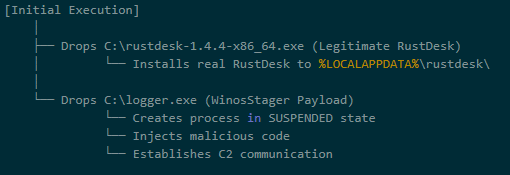
The malware executes through a staged process, with each step designed to evade detection and establish persistence:
**Stage 1: The trojanized installer**
The downloaded file (`rustdesk-1.4.4-x86_64.exe`) acts as both **dropper and decoy**. It writes two files to disk:
* The legitimate RustDesk installer, which is executed to maintain cover
* `logger.exe`, the Winos4.0 payload
The malware hides in plain sight. While the user watches RustDesk install normally, the malicious payload is quietly staged in the background.
**Stage 2: Loader execution**
The `logger.exe` file is a loader — its job is to set up the environment for the main implant. During execution, it:
* Creates a new process
* Allocates executable memory
* Transitions execution to a new runtime identity: `Libserver.exe`
This loader-to-implant handoff is a common technique in sophisticated malware to separate the initial dropper from the persistent backdoor.
By changing its process name, the malware makes forensic analysis harder. Defenders looking for "`logger.exe`" won't find a running process with that name.
**Stage 3: In-memory module deployment**
The `Libserver.exe` process unpacks the actual Winos4.0 framework entirely in memory. Several WinosStager DLL modules—and a large ~128 MB payload—are loaded without being written to disk as standalone files.
Traditional antivirus tools focus on scanning files on disk (file-based detection). By keeping its functional components in memory only, the malware significantly reduces the effectiveness of file-based detection. This is why behavioral analysis and memory scanning are critical for detecting threats like Winos4.0.
## The hidden payload: Winos4.0
The secondary payload is identified as **Winos4.0 (WinosStager)** : a sophisticated remote access framework that has been observed in multiple campaigns, particularly targeting users in Asia.
Once active, it allows attackers to:
* Monitor victim activity and capture screenshots
* Log keystrokes and steal credentials
* Download and execute additional malware
* Maintain persistent access even after system reboots
This isn't simple malware—it's a full-featured attack framework. Once installed, attackers have a foothold they can use to conduct espionage, steal data, or deploy ransomware at a time of their choosing.
## Technical detail: How the malware hides
The malware employs several techniques to avoid detection:
**What it does**| **How it achieves this**| **Why it matters**
---|---|---
**Runs entirely in memory**| Loads executable code without writing files| Evades file-based detection
**Detects analysis environments**| Checks available system memory and looks for debugging tools| Prevents security researchers from analyzing its behavior
**Checks system language**| Queries locale settings via the Windows registry| May be used to target (or avoid) specific geographic regions
**Clears browser history**| Invokes system APIs to delete browsing data| Removes evidence of how the victim found the malicious site
**Hides configuration in the registry**| Stores encrypted data in unusual registry paths| Hides configuration from casual inspection
## **Command-and-control activity**
Shortly after installation, the malware connects to an attacker-controlled server:
* **IP:** 207.56.13[.]76
* **Port:** 5666/TCP
This connection allows attackers to send commands to the infected machine and receive stolen data in return. Network analysis confirmed sustained two-way communication consistent with an established command-and-control session.
## **How the malware blends into normal traffic**
The malware is particularly clever in how it disguises its network activity:
**Destination**| **Purpose**
---|---
207.56.13[.]76:5666| **Malicious:** Command-and-control server
209.250.254.15:21115-21116| **Legitimate:** RustDesk relay traffic
api.rustdesk.com:443| **Legitimate:** RustDesk API
Because the victim installed real RustDesk, the malware's network traffic is mixed with legitimate remote desktop traffic. This makes it much harder for network security tools to identify the malicious connections: the infected computer looks like it's just running RustDesk.
## What this campaign reveals
This attack demonstrates a troubling trend: legitimate software used as camouflage for malware.
The attackers didn't need to find a zero-day vulnerability or craft a sophisticated exploit. They simply:
1. Registered a convincing domain name
2. Cloned a legitimate website
3. Bundled real software with their malware
4. Let the victim do the rest
This approach works because it exploits human trust rather than technical weaknesses. When software behaves exactly as expected, users have no reason to suspect compromise.
## Indicators of compromise
### File hashes (SHA256)
File| SHA256| Classification
---|---|---
Trojanized installer| 330016ab17f2b03c7bc0e10482f7cb70d44a46f03ea327cd6dfe50f772e6af30| Malicious
logger.exe / Libserver.exe| 5d308205e3817adcfdda849ec669fa75970ba8ffc7ca643bf44aa55c2085cb86| Winos4.0 loader
RustDesk binary| c612fd5a91b2d83dd9761f1979543ce05f6fa1941de3e00e40f6c7cdb3d4a6a0| Legitimate
### Network indicators
**Malicious domain:** rustdesk[.]work
**C2 server:** 207.56.13[.]76:5666/TCP
### In-memory payloads
During execution, the malware unpacks several additional components directly into memory:
**SHA256**| **Size**| **Type**
---|---|---
a71bb5cf751d7df158567d7d44356a9c66b684f2f9c788ed32dadcdefd9c917a| 107 KB| WinosStager DLL
900161e74c4dbab37328ca380edb651dc3e120cfca6168d38f5f53adffd469f6| 351 KB| WinosStager DLL
770261423c9b0e913cb08e5f903b360c6c8fd6d70afdf911066bc8da67174e43| 362 KB| WinosStager DLL
1354bd633b0f73229f8f8e33d67bab909fc919072c8b6d46eee74dc2d637fd31| 104 KB| WinosStager DLL
412b10c7bb86adaacc46fe567aede149d7c835ebd3bcab2ed4a160901db622c7| ~128 MB| In-memory payload
00781822b3d3798bcbec378dfbd22dc304b6099484839fe9a193ab2ed8852292| 307 KB| In-memory payload
## How to protect yourself
The rustdesk[.]work campaign shows how attackers can gain access without exploits, warnings, or broken software. By hiding behind trusted open-source tools, this attack achieved persistence and cover while giving victims no reason to suspect compromise.
The takeaway is simple: _software behaving normally does not mean it’s safe._ Modern threats are designed to blend in, making layered defenses and behavioral detection essential.
**For individuals:**
* **Always verify download sources.** Before downloading software, check that the domain matches the official project. For RustDesk, the legitimate site is rustdesk.com—not rustdesk.work or similar variants.
* **Be suspicious of search results.** Attackers use SEO poisoning to push malicious sites to the top of search results. When possible, navigate directly to official websites rather than clicking search links.
* **Use security software.** Malwarebytes Premium Security detects malware families like Winos4.0, even when bundled with legitimate software.
**For businesses:**
* **Monitor for unusual network connections.** Outbound traffic on port 5666/TCP, or connections to unfamiliar IP addresses from systems running remote desktop software, should be investigated.
* **Implement application allowlisting.** Restrict which applications can run in your environment to prevent unauthorized software execution.
* **Educate users about typosquatting.** Training programs should include examples of fake websites and how to verify legitimate download sources.
* **Block known malicious infrastructure.** Add the IOCs listed above to your security tools.
* * *
**We don’t just report on threats—we remove them**
Cybersecurity risks should never spread beyond a headline. Keep threats off your devices by downloading Malwarebytes today.
You need to set up remote access to a colleague’s computer. You do a Google search for “RustDesk download,” click one of the top results, and land on a polished website with documentation, downloads, and familiar branding.
You install the software, launch it, and everything works exactly as expected.
What you don’t see is the second program that installs alongside it—one that quietly gives attackers persistent access to your computer.
That’s exactly what we observed in a campaign using the fake domain **rustdesk[.]work**.
## The bait: a near-perfect impersonation
We identified a malicious website at **rustdesk[.]work** impersonating the legitimate RustDesk project, which is hosted at **rustdesk.com**. The fake site closely mirrors the real one, complete with multilingual content and prominent warnings claiming (ironically) that rustdesk[.]work is the _only_ _official domain_.
This campaign doesn’t exploit software vulnerabilities or rely on advanced hacking techniques. It succeeds entirely through deception. When a website looks legitimate and the software behaves normally, most users never suspect anything is wrong.


## What happens when you run the installer
The installer performs a deliberate bait-and-switch:
1. It installs **real RustDesk** , fully functional and unmodified
2. It quietly installs **a hiddenbackdoor**, a malware framework known as **Winos4.0**
The user sees RustDesk launch normally. Everything appears to work. Meanwhile, the backdoor quietly establishes a connection to the attacker's server.
By bundling malware with working software, attackers remove the most obvious red flag: broken or missing functionality. From the user’s point of view, nothing feels wrong.
## Inside the infection chain
The malware executes through a staged process, with each step designed to evade detection and establish persistence:

**Stage 1: The trojanized installer**
The downloaded file (`rustdesk-1.4.4-x86_64.exe`) acts as both **dropper and decoy**. It writes two files to disk:
* The legitimate RustDesk installer, which is executed to maintain cover
* `logger.exe`, the Winos4.0 payload
The malware hides in plain sight. While the user watches RustDesk install normally, the malicious payload is quietly staged in the background.
**Stage 2: Loader execution**
The `logger.exe` file is a loader — its job is to set up the environment for the main implant. During execution, it:
* Creates a new process
* Allocates executable memory
* Transitions execution to a new runtime identity: `Libserver.exe`
This loader-to-implant handoff is a common technique in sophisticated malware to separate the initial dropper from the persistent backdoor.
By changing its process name, the malware makes forensic analysis harder. Defenders looking for "`logger.exe`" won't find a running process with that name.
**Stage 3: In-memory module deployment**
The `Libserver.exe` process unpacks the actual Winos4.0 framework entirely in memory. Several WinosStager DLL modules—and a large ~128 MB payload—are loaded without being written to disk as standalone files.
Traditional antivirus tools focus on scanning files on disk (file-based detection). By keeping its functional components in memory only, the malware significantly reduces the effectiveness of file-based detection. This is why behavioral analysis and memory scanning are critical for detecting threats like Winos4.0.
## The hidden payload: Winos4.0
The secondary payload is identified as **Winos4.0 (WinosStager)** : a sophisticated remote access framework that has been observed in multiple campaigns, particularly targeting users in Asia.
Once active, it allows attackers to:
* Monitor victim activity and capture screenshots
* Log keystrokes and steal credentials
* Download and execute additional malware
* Maintain persistent access even after system reboots
This isn't simple malware—it's a full-featured attack framework. Once installed, attackers have a foothold they can use to conduct espionage, steal data, or deploy ransomware at a time of their choosing.
## Technical detail: How the malware hides
The malware employs several techniques to avoid detection:
**What it does**| **How it achieves this**| **Why it matters**
---|---|---
**Runs entirely in memory**| Loads executable code without writing files| Evades file-based detection
**Detects analysis environments**| Checks available system memory and looks for debugging tools| Prevents security researchers from analyzing its behavior
**Checks system language**| Queries locale settings via the Windows registry| May be used to target (or avoid) specific geographic regions
**Clears browser history**| Invokes system APIs to delete browsing data| Removes evidence of how the victim found the malicious site
**Hides configuration in the registry**| Stores encrypted data in unusual registry paths| Hides configuration from casual inspection
## **Command-and-control activity**
Shortly after installation, the malware connects to an attacker-controlled server:
* **IP:** 207.56.13[.]76
* **Port:** 5666/TCP
This connection allows attackers to send commands to the infected machine and receive stolen data in return. Network analysis confirmed sustained two-way communication consistent with an established command-and-control session.
## **How the malware blends into normal traffic**
The malware is particularly clever in how it disguises its network activity:
**Destination**| **Purpose**
---|---
207.56.13[.]76:5666| **Malicious:** Command-and-control server
209.250.254.15:21115-21116| **Legitimate:** RustDesk relay traffic
api.rustdesk.com:443| **Legitimate:** RustDesk API
Because the victim installed real RustDesk, the malware's network traffic is mixed with legitimate remote desktop traffic. This makes it much harder for network security tools to identify the malicious connections: the infected computer looks like it's just running RustDesk.
## What this campaign reveals
This attack demonstrates a troubling trend: legitimate software used as camouflage for malware.
The attackers didn't need to find a zero-day vulnerability or craft a sophisticated exploit. They simply:
1. Registered a convincing domain name
2. Cloned a legitimate website
3. Bundled real software with their malware
4. Let the victim do the rest
This approach works because it exploits human trust rather than technical weaknesses. When software behaves exactly as expected, users have no reason to suspect compromise.
## Indicators of compromise
### File hashes (SHA256)
File| SHA256| Classification
---|---|---
Trojanized installer| 330016ab17f2b03c7bc0e10482f7cb70d44a46f03ea327cd6dfe50f772e6af30| Malicious
logger.exe / Libserver.exe| 5d308205e3817adcfdda849ec669fa75970ba8ffc7ca643bf44aa55c2085cb86| Winos4.0 loader
RustDesk binary| c612fd5a91b2d83dd9761f1979543ce05f6fa1941de3e00e40f6c7cdb3d4a6a0| Legitimate
### Network indicators
**Malicious domain:** rustdesk[.]work
**C2 server:** 207.56.13[.]76:5666/TCP
### In-memory payloads
During execution, the malware unpacks several additional components directly into memory:
**SHA256**| **Size**| **Type**
---|---|---
a71bb5cf751d7df158567d7d44356a9c66b684f2f9c788ed32dadcdefd9c917a| 107 KB| WinosStager DLL
900161e74c4dbab37328ca380edb651dc3e120cfca6168d38f5f53adffd469f6| 351 KB| WinosStager DLL
770261423c9b0e913cb08e5f903b360c6c8fd6d70afdf911066bc8da67174e43| 362 KB| WinosStager DLL
1354bd633b0f73229f8f8e33d67bab909fc919072c8b6d46eee74dc2d637fd31| 104 KB| WinosStager DLL
412b10c7bb86adaacc46fe567aede149d7c835ebd3bcab2ed4a160901db622c7| ~128 MB| In-memory payload
00781822b3d3798bcbec378dfbd22dc304b6099484839fe9a193ab2ed8852292| 307 KB| In-memory payload
## How to protect yourself
The rustdesk[.]work campaign shows how attackers can gain access without exploits, warnings, or broken software. By hiding behind trusted open-source tools, this attack achieved persistence and cover while giving victims no reason to suspect compromise.
The takeaway is simple: _software behaving normally does not mean it’s safe._ Modern threats are designed to blend in, making layered defenses and behavioral detection essential.
**For individuals:**
* **Always verify download sources.** Before downloading software, check that the domain matches the official project. For RustDesk, the legitimate site is rustdesk.com—not rustdesk.work or similar variants.
* **Be suspicious of search results.** Attackers use SEO poisoning to push malicious sites to the top of search results. When possible, navigate directly to official websites rather than clicking search links.
* **Use security software.** Malwarebytes Premium Security detects malware families like Winos4.0, even when bundled with legitimate software.
**For businesses:**
* **Monitor for unusual network connections.** Outbound traffic on port 5666/TCP, or connections to unfamiliar IP addresses from systems running remote desktop software, should be investigated.
* **Implement application allowlisting.** Restrict which applications can run in your environment to prevent unauthorized software execution.
* **Educate users about typosquatting.** Training programs should include examples of fake websites and how to verify legitimate download sources.
* **Block known malicious infrastructure.** Add the IOCs listed above to your security tools.
* * *
**We don’t just report on threats—we remove them**
Cybersecurity risks should never spread beyond a headline. Keep threats off your devices by downloading Malwarebytes today.
Basic Information
ID
MALWAREBYTES:94D6834859C409033C7B7159C2EE24C4
Published
Jan 14, 2026 at 11:02