
Security Update News
Update Information
| Title | Google Chrome will use AI to block tech support scam websites |
|---|---|
| Update ID | MALWAREBYTES:FF15CBCA8BD5449E27C8793B72224BBE |
| Type | malwarebytes |
| Published | 2025-05-09T17:43:22 |
| Last Updated | 2025-05-09T17:43:22 |
Security Impact
| CVSS Score | 0.0 |
|---|---|
| Severity | NONE |
| Attack Vector |
Affected CVEs
Update Details
With the launch of Chrome version 137, Google plans to use the on-device Gemini Nano large language model (LLM) to recognize and block tech support scams.
Users already have the ability to chose Enhanced Protection under **Settings > Privacy and security > Security > Safe Browsing.**
Safe Browsing settings
Google’s reasoning, and we agree, is that LLMs are fairly good at understanding and classifying the varied, complex nature of websites. Meaning that, since many malicious sites have a very short lifespan, it is more effective to learn and recognize their behavior rather than keep adding a host of domain names to a block-list (something which Google has frustrated with the introduction of Manifest V3, by the way).
Tech support scams typically follow a certain pattern that should be simple to learn:
* They make your browser tab full screen
* Display the number they want you to call all over the place
* Show the visitor fake ongoing scans and alerts
These are just a few of the characteristics I’d teach the LLM. I’m not speaking for Google here. They just mention they’ll be looking at usage of the Keyboard Lock API.
On that, the Keyboard Lock API is a web technology that allows websites to “capture” keyboard input, meaning they can prevent certain key combinations (or all keys) from working as they normally do in your browser or operating system. Originally, this tool was designed for legitimate purposes, like making web games or remote desktop apps more immersive by stopping accidental key presses from interrupting the experience. But tech support scammers exploit the Keyboard Lock API to make it harder for victims to escape their scam pages. This means that when a visitor tries to close the scam page or switch to another program, nothing happens, making them feel trapped on the site. Which also makes them think their system is actually infected.
Google explains why it went for the on-device method, saying it allows them to see the threats at the same moment the users see them and in the same way the users see them.
> “We’ve found that the average malicious site exists for less than 10 minutes, so on-device protection allows us to detect and block attacks that haven’t been crawled before.”
## How it works
When the user lands on a suspicious page, which is decided by the on-device LLM, based on specific triggers like the Keyboard Lock API, Chrome provides the LLM with the contents of the page that the user is on and queries it to extract security signals, such as the intent of the page. This information is then sent to a Safe Browsing server for a final verdict.
If Safe Browsing decides the website is malicious, Chrome will block the content and show the user a big warning screen, called an “interstitial.”
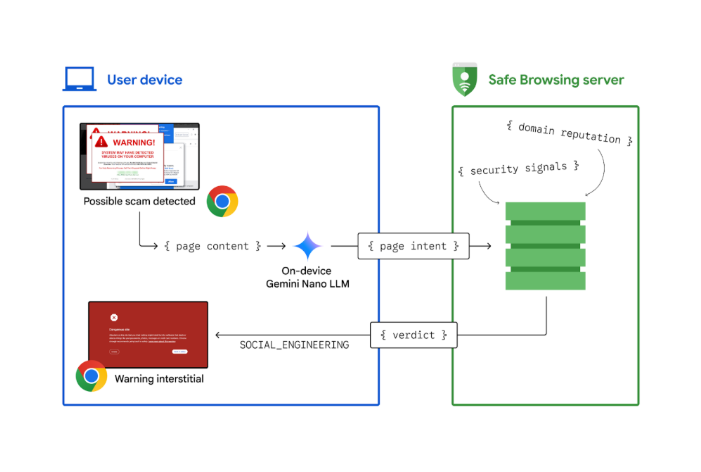Image courtesy of Google
By making the target think their system is infected, tech support scammers try to gain remote access or obtain payment information. Google says:
> “Tech Support scams are an increasingly prevalent form of cybercrime, characterized by deceptive tactics aimed at extorting money or gaining unauthorized access to sensitive data.”
Malwarebytes’ Browser Guard data over the last month shows that 30% of the fraudulent websites we blocked through the browser extensions are tech support scams.
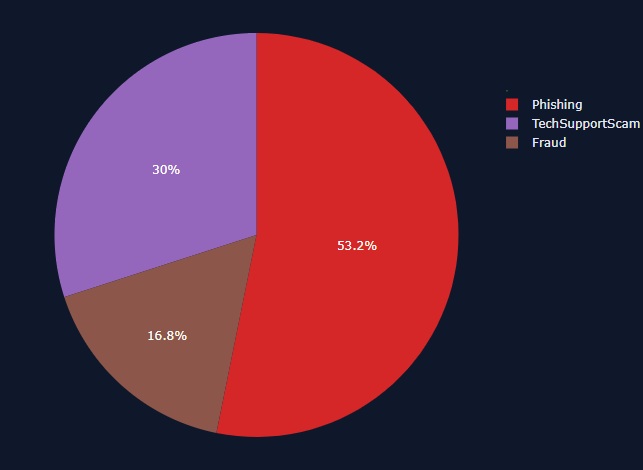30% of the three fraud categories are TSS
So, it’s nice of Google to let Chrome help us take care of some of those, but Chrome is not the only browser. We’re even hearing stories from users that ran into a website telling them their Windows machine was infected while they were using the Safari browser on their iPad.
* * *
**We don’t just report on phone security—we provide it**
Cybersecurity risks should never spread beyond a headline. Keep threats off your mobile devices by downloading Malwarebytes for iOS, and Malwarebytes for Android today.