
Description
A trojanized Slack download from a typosquatting website is giving attackers something most users wouldn’t even know to look for: a hidden desktop running on their machine.
The installer looks legitimate and even launches a working copy of Slack. But in the background, it can create an invisible session where attackers can browse, access accounts, and interact with your system without anything appearing on your screen. To be clear, this campaign has nothing to do with Slack, the company, and we’ve let them know what we found.
Slack has tens of millions of daily active users across more than 200,000 paying organisations in over 150 countries, including 77 of the Fortune 100. So a trojanized installer is not just a threat to the individual who runs it, but also to corporate networks, SSO-linked accounts, and internal communications.
## **Everyone trusts the logo**
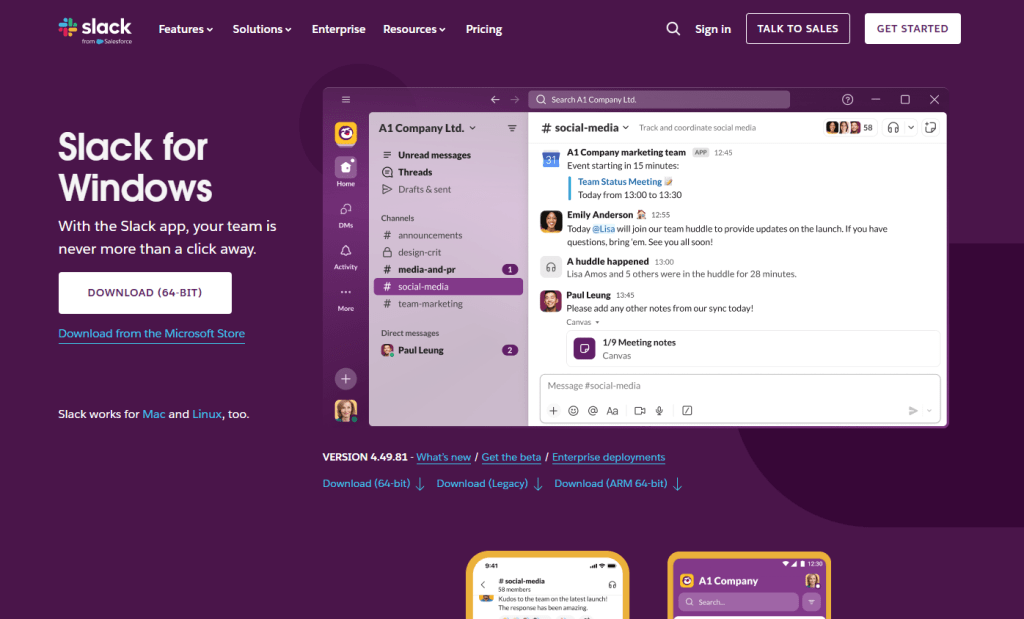Fake Slack website
Slack is one of those apps that people install without a second thought. It sits alongside Chrome and Zoom in the pantheon of software that workers download on day one of a new job, often from a quick Google search rather than a bookmarked link. That's what makes it such a compelling lure. The brand is instantly recognisable, the installer is something millions of people have run before, and the whole experience of watching it set up feels completely ordinary.
The attackers behind this campaign registered the domain `slacks[.]pro` (note the extra “s” and the .pro top-level domain instead of .com). The site's source code includes a JavaScript click handler that intercepts every click on the page and redirects the browser to a download hosted on a separate domain, `debtclean-ua[.]sbs`. The only clicks excluded are the cookie consent buttons; everything else triggers the download. This is not a true drive-by that exploits the browser silently, but it's close enough: it requires just one click from a distracted user.
What arrives on the victim’s desktop is a file named `slack-4-49-81.exe`, a name that mirrors Slack’s real version numbering closely enough that most people wouldn’t hesitate.
JavaScript click handler
This isn't an obscure tactic. In August 2024, we documented a near-identical campaign using fraudulent Google Ads to redirect Slack searches to a malicious download page. Those attacks delivered SecTopRAT, a remote access Trojan with stealer capabilities.
These campaigns keep coming back because the formula works: attackers take a trusted brand, register a convincing domain, and count on the fact that most people do not scrutinise a URL when they're just trying to get set up for work.
## **A real install and a hidden loader, running side by side**
Here's what makes this particular sample clever: it doesn't just pretend to install Slack. It actually installs a working copy of the application while simultaneously running a malware loader in the background. The victim sees a legitimate splash screen, watches Slack appear in their taskbar, and has no reason to suspect anything went wrong.
* * *
## **Picked up something you shouldn 't have?**
Run a free Malwarebytes scan and find out.
SCAN NOW
* * *
Within seconds of being launched, `slack-4-49-81.exe` writes two temporary files to the user’s `%TEMP%` folder. The first, `slack.tmp`, is the decoy: a self-extracting Squirrel installer package. Squirrel is a legitimate, open-source update framework built into dozens of Electron apps including the real Slack, Discord, and Microsoft Teams. The dropper bundles a genuine copy of Squirrel’s `Update.exe` alongside a NuGet package called `slack-4.49.81-full.nupkg`, a branded splash image (`background.gif`), and a release manifest. When `slack.tmp` runs, it unpacks all of this into `%LOCALAPPDATA%\SquirrelTemp`, launches `Update.exe` with a standard `--install` flag, and from that point on, the Slack installation proceeds exactly as it would if the user had downloaded the app from `slack.com`. Slack opens, looks right, and works.
The second file, `svc.tmp`, arrives seconds later. This is the loader: a separate ~519KB executable embedded inside the 150MB installer and extracted into `%TEMP%` alongside the decoy. It is unsigned, identifies itself in its portable executable (PE) metadata as Windows Component Update Service by Microsoft Corporation, and has no relationship to the Squirrel framework or the Slack application being installed next to it. Almost immediately it creates a small file called `loader_log.txt` in the temp folder, confirming the loader stage has started, and attempts to contact a command-and-control (C2) server at `94.232.46.16` on TCP port `8081`.
Meanwhile, the Squirrel installation completes and writes a registry Run key to survive reboots: value name `com.squirrel.slack.slack` under `HKCU\SOFTWARE\Microsoft\Windows\CurrentVersion\Run`. This is the exact key name and path that a legitimate Slack installation creates. An IT admin scrolling through autostart entries would see what looks like a normal Slack install and keep moving.
## **Inside the loader: what static analysis reveals**
To understand what the loader is engineered to do once it has a C2 channel, we examined the binary directly. Its PE version information claims to be a Windows Component Update Service (internal name `WinSvcUpd.exe`), published by Microsoft Corporation, version 1.4.2.0. None of this is true. It's a false flag designed to survive a glance in a process list or task manager.
The binary is a 64-bit Windows executable compiled with MSVC. Its seven PE sections carry randomised names, like .`7ssik`, `.d1npl`, .`m6zef`, rather than the standard .text and .rdata produced by normal compilers, consistent with the use of a custom builder or crypter tool. Its import table is deliberately minimal: 90 functions from `KERNEL32.dll` and nothing else. There are no static imports for networking, registry access, or process manipulation. Instead, it resolves those APIs at runtime using `GetProcAddress` and `LoadLibraryExW`, a standard technique that hides the binary’s real capabilities from import-table analysis.
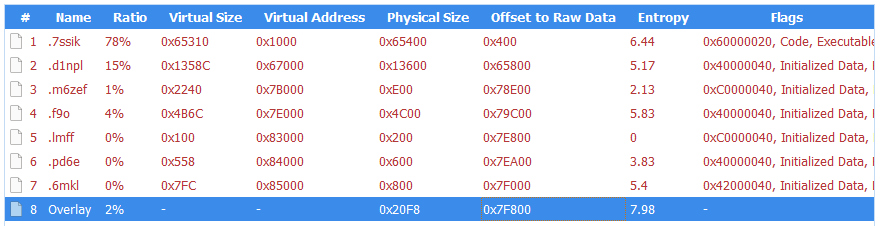PE sections
What makes this sample unusual for a loader is how talkative it is internally. The binary is laced with debug strings that lay out its entire architecture, organised into labelled subsystems. These strings were never meant for the victim to see. They are developer diagnostics left in the build, and they tell us exactly what this tool was designed to do.
Strings prefixed `[P1]` describe the first phase: the loader downloads a payload from its C2 (`[P1] Downloading payload...`). The download itself uses WinHTTP, resolved at runtime. The debug strings `[HTTP] Connect`, `[HTTP] Send`, and `[HTTP] Recv` trace the full request cycle, while `[HTTP] winhttp unavailable` reveals the fallback path if the library cannot be loaded. It stores the payload in shared memory via Windows file-mapping APIs (`[P1] Payload in shared memory`), and launches a second copy of itself as Phase 2 (`[P1] Phase-2 launched`). Phase 2 reads the payload from shared memory (`[P2] Payload copied from shared memory`) and decrypts it. The strings `[CRYPT] Decrypting...` and `[CRYPT] MZ OK` confirm the payload arrives encrypted and is validated as a Windows executable after decryption. The decrypted DLL is written to disk under a filename matching the pattern `wmiprvse_*.tmp`, designed to blend in with temporary files created by the legitimate Windows WMI Provider Host.
The loader is then designed to call a specific exported function from the decrypted DLL: `HvncRun`. The strings `[LOAD] Calling HvncRun...` and `--- HvncClient log ---` identify the payload as an HVNC client, a Hidden Virtual Network Computing tool. HVNC differs from a conventional remote access Trojan in a critical way: it creates a completely separate, invisible desktop session on the victim’s machine. The attacker can open browsers, access banking portals, and interact with authenticated sessions without anything appearing on the user’s visible screen. It's a tool primarily associated with financial fraud operations.
To run the HVNC payload covertly, the loader is equipped to inject the DLL into `explorer.exe` using a technique known as section-based injection. The strings `[INJ] === Section-based injection into explorer.exe ===` and `[INJ] Remote thread created in explorer.exe!` describe a sequence in which the loader creates a shared memory section via `NtCreateSection`, maps it into both its own process and the Windows shell, writes shellcode and the DLL path into the shared region, and starts a remote thread via `NtCreateThreadEx`. This is a harder-to-detect variant of process injection than the classic `WriteProcessMemory` approach, because it avoids writing directly into the target’s memory space. If the NT APIs are unavailable, the loader falls back to writing the DLL to disk and loading it directly (`[INJ] Required NT APIs not available, falling back to DropAndLoad`).
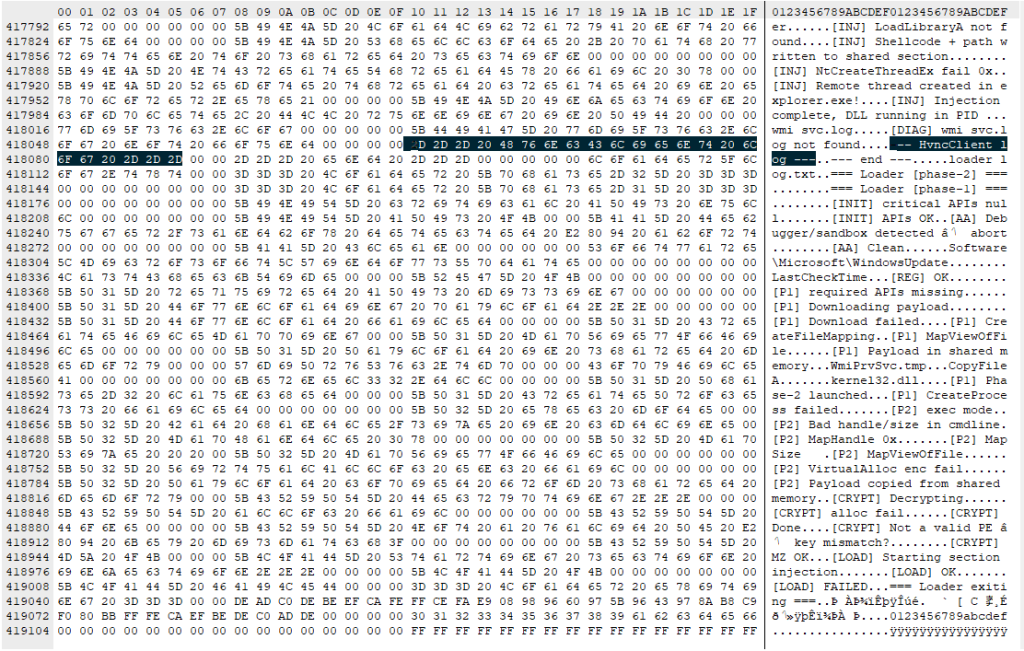
The binary includes active anti-analysis defences. The string `[AA] Debugger/sandbox detected` indicates it checks for observation and alters its behaviour accordingly. It has the tools to do so: `IsDebuggerPresent` and `GetTickCount` appear in the import table, commonly used for debugger detection and timing-based sandbox evasion, though both are also standard CRT imports in any MSVC-compiled binary. The debug string is the stronger signal that these APIs are used intentionally.
## **What this means for someone who ran it**
If you downloaded Slack from anywhere other than `slack.com` recently, particularly from a domain ending in `.pro`, or one that auto-downloaded a file when you clicked anywhere on the page, take it seriously.
The loader attempts to reach its C2 server before the Slack window finishes loading. It is engineered to use that connection (if established) to download and decrypt an HVNC payload and inject it into `explorer.exe` to operate from within the Windows shell itself. The Squirrel installation writes the same Run key that a legitimate Slack install would, so the autostart entry is indistinguishable from a clean machine. Meanwhile, the loader only needs to succeed once: if it downloads the HVNC payload and injects it into `explorer.exe` during the initial execution, the attacker has a foothold that lasts until the next reboot. Whether additional persistence for the payload exists depends on the C2 operator's next moves.
## How to stay safe
This campaign is a case study in how much engineering effort goes into looking ordinary. One code path installs real software through a legitimate framework. The other runs a multi-phase loader with dynamic API resolution, encrypted payload delivery, process injection into the Windows shell, and anti-analysis defences, all packed into a binary that identifies itself as a Microsoft service. The decoy hides what's going on, while the loader gives the attacker a foothold.
Bookmark the real download pages for the software you use. If you find yourself Googling “Slack download” and clicking the first result that looks right, you're exactly the person this campaign was built to catch.
* **Only download Slack from the official site**. Go directly to slack.com or use a trusted bookmark. Avoid clicking ads or unfamiliar links.
* **Check the URL carefully**. Look for subtle changes like extra letters or unusual domains (for example, “.pro” instead of “.com”).
* **Be wary of sites that trigger downloads on click**. If a page starts downloading a file when you click anywhere, close it.
* **Verify the installer before running it**. Right-click the file, check its properties, and look for a valid digital signature.
* **Usereal-time security protection**. A security tool can block known malicious domains and catch suspicious behavior during installation.
* **Watch for unusual behavior after installing software**. Unexpected network activity, slowdowns, or unknown processes are worth investigating.
* **If something feels off, act quickly**. Disconnect from the internet, run a full scan, and change your passwords from a clean device, especially for email, banking, and work accounts.
### **What to do if you may have been affected**
* Disconnect from the network immediately to sever any active C2 session.
* Run a full scan with Malwarebytes.
* Change all passwords for accounts you have accessed from this machine. Do this from a different, clean device. Prioritise email, banking, and SSO accounts.
* If this was a work machine, notify your IT or security team immediately.
## **Indicators of Compromise (IOCs)**
**File hashes (SHA-256)**
`cfd2e466ea5ac50f9d9267f3535a68a23e4ff62e3fe3e20a30ec52024553c564` (`slack-4-49-81.exe`)
`08fd0a82cdeb0a963b7416cf57446564dfed5de5c6f66dee94b36d28bfefec9d` (`svc.tmp`)
**Distribution**
`slacks[.]pro`
`debtclean-ua[.]sbs`
**Network indicators**
`94.232.46.16:8081`
* * *
## ****“One of the best cybersecurity suites on the planet.”** **
According to CNET. Read their review →

* * *
The installer looks legitimate and even launches a working copy of Slack. But in the background, it can create an invisible session where attackers can browse, access accounts, and interact with your system without anything appearing on your screen. To be clear, this campaign has nothing to do with Slack, the company, and we’ve let them know what we found.
Slack has tens of millions of daily active users across more than 200,000 paying organisations in over 150 countries, including 77 of the Fortune 100. So a trojanized installer is not just a threat to the individual who runs it, but also to corporate networks, SSO-linked accounts, and internal communications.
## **Everyone trusts the logo**
Fake Slack website
Slack is one of those apps that people install without a second thought. It sits alongside Chrome and Zoom in the pantheon of software that workers download on day one of a new job, often from a quick Google search rather than a bookmarked link. That's what makes it such a compelling lure. The brand is instantly recognisable, the installer is something millions of people have run before, and the whole experience of watching it set up feels completely ordinary.
The attackers behind this campaign registered the domain `slacks[.]pro` (note the extra “s” and the .pro top-level domain instead of .com). The site's source code includes a JavaScript click handler that intercepts every click on the page and redirects the browser to a download hosted on a separate domain, `debtclean-ua[.]sbs`. The only clicks excluded are the cookie consent buttons; everything else triggers the download. This is not a true drive-by that exploits the browser silently, but it's close enough: it requires just one click from a distracted user.
What arrives on the victim’s desktop is a file named `slack-4-49-81.exe`, a name that mirrors Slack’s real version numbering closely enough that most people wouldn’t hesitate.
JavaScript click handler
This isn't an obscure tactic. In August 2024, we documented a near-identical campaign using fraudulent Google Ads to redirect Slack searches to a malicious download page. Those attacks delivered SecTopRAT, a remote access Trojan with stealer capabilities.
These campaigns keep coming back because the formula works: attackers take a trusted brand, register a convincing domain, and count on the fact that most people do not scrutinise a URL when they're just trying to get set up for work.
## **A real install and a hidden loader, running side by side**
Here's what makes this particular sample clever: it doesn't just pretend to install Slack. It actually installs a working copy of the application while simultaneously running a malware loader in the background. The victim sees a legitimate splash screen, watches Slack appear in their taskbar, and has no reason to suspect anything went wrong.
* * *
## **Picked up something you shouldn 't have?**
Run a free Malwarebytes scan and find out.
SCAN NOW
* * *
Within seconds of being launched, `slack-4-49-81.exe` writes two temporary files to the user’s `%TEMP%` folder. The first, `slack.tmp`, is the decoy: a self-extracting Squirrel installer package. Squirrel is a legitimate, open-source update framework built into dozens of Electron apps including the real Slack, Discord, and Microsoft Teams. The dropper bundles a genuine copy of Squirrel’s `Update.exe` alongside a NuGet package called `slack-4.49.81-full.nupkg`, a branded splash image (`background.gif`), and a release manifest. When `slack.tmp` runs, it unpacks all of this into `%LOCALAPPDATA%\SquirrelTemp`, launches `Update.exe` with a standard `--install` flag, and from that point on, the Slack installation proceeds exactly as it would if the user had downloaded the app from `slack.com`. Slack opens, looks right, and works.
The second file, `svc.tmp`, arrives seconds later. This is the loader: a separate ~519KB executable embedded inside the 150MB installer and extracted into `%TEMP%` alongside the decoy. It is unsigned, identifies itself in its portable executable (PE) metadata as Windows Component Update Service by Microsoft Corporation, and has no relationship to the Squirrel framework or the Slack application being installed next to it. Almost immediately it creates a small file called `loader_log.txt` in the temp folder, confirming the loader stage has started, and attempts to contact a command-and-control (C2) server at `94.232.46.16` on TCP port `8081`.
Meanwhile, the Squirrel installation completes and writes a registry Run key to survive reboots: value name `com.squirrel.slack.slack` under `HKCU\SOFTWARE\Microsoft\Windows\CurrentVersion\Run`. This is the exact key name and path that a legitimate Slack installation creates. An IT admin scrolling through autostart entries would see what looks like a normal Slack install and keep moving.
## **Inside the loader: what static analysis reveals**
To understand what the loader is engineered to do once it has a C2 channel, we examined the binary directly. Its PE version information claims to be a Windows Component Update Service (internal name `WinSvcUpd.exe`), published by Microsoft Corporation, version 1.4.2.0. None of this is true. It's a false flag designed to survive a glance in a process list or task manager.
The binary is a 64-bit Windows executable compiled with MSVC. Its seven PE sections carry randomised names, like .`7ssik`, `.d1npl`, .`m6zef`, rather than the standard .text and .rdata produced by normal compilers, consistent with the use of a custom builder or crypter tool. Its import table is deliberately minimal: 90 functions from `KERNEL32.dll` and nothing else. There are no static imports for networking, registry access, or process manipulation. Instead, it resolves those APIs at runtime using `GetProcAddress` and `LoadLibraryExW`, a standard technique that hides the binary’s real capabilities from import-table analysis.
PE sections
What makes this sample unusual for a loader is how talkative it is internally. The binary is laced with debug strings that lay out its entire architecture, organised into labelled subsystems. These strings were never meant for the victim to see. They are developer diagnostics left in the build, and they tell us exactly what this tool was designed to do.
Strings prefixed `[P1]` describe the first phase: the loader downloads a payload from its C2 (`[P1] Downloading payload...`). The download itself uses WinHTTP, resolved at runtime. The debug strings `[HTTP] Connect`, `[HTTP] Send`, and `[HTTP] Recv` trace the full request cycle, while `[HTTP] winhttp unavailable` reveals the fallback path if the library cannot be loaded. It stores the payload in shared memory via Windows file-mapping APIs (`[P1] Payload in shared memory`), and launches a second copy of itself as Phase 2 (`[P1] Phase-2 launched`). Phase 2 reads the payload from shared memory (`[P2] Payload copied from shared memory`) and decrypts it. The strings `[CRYPT] Decrypting...` and `[CRYPT] MZ OK` confirm the payload arrives encrypted and is validated as a Windows executable after decryption. The decrypted DLL is written to disk under a filename matching the pattern `wmiprvse_*.tmp`, designed to blend in with temporary files created by the legitimate Windows WMI Provider Host.
The loader is then designed to call a specific exported function from the decrypted DLL: `HvncRun`. The strings `[LOAD] Calling HvncRun...` and `--- HvncClient log ---` identify the payload as an HVNC client, a Hidden Virtual Network Computing tool. HVNC differs from a conventional remote access Trojan in a critical way: it creates a completely separate, invisible desktop session on the victim’s machine. The attacker can open browsers, access banking portals, and interact with authenticated sessions without anything appearing on the user’s visible screen. It's a tool primarily associated with financial fraud operations.
To run the HVNC payload covertly, the loader is equipped to inject the DLL into `explorer.exe` using a technique known as section-based injection. The strings `[INJ] === Section-based injection into explorer.exe ===` and `[INJ] Remote thread created in explorer.exe!` describe a sequence in which the loader creates a shared memory section via `NtCreateSection`, maps it into both its own process and the Windows shell, writes shellcode and the DLL path into the shared region, and starts a remote thread via `NtCreateThreadEx`. This is a harder-to-detect variant of process injection than the classic `WriteProcessMemory` approach, because it avoids writing directly into the target’s memory space. If the NT APIs are unavailable, the loader falls back to writing the DLL to disk and loading it directly (`[INJ] Required NT APIs not available, falling back to DropAndLoad`).

The binary includes active anti-analysis defences. The string `[AA] Debugger/sandbox detected` indicates it checks for observation and alters its behaviour accordingly. It has the tools to do so: `IsDebuggerPresent` and `GetTickCount` appear in the import table, commonly used for debugger detection and timing-based sandbox evasion, though both are also standard CRT imports in any MSVC-compiled binary. The debug string is the stronger signal that these APIs are used intentionally.
## **What this means for someone who ran it**
If you downloaded Slack from anywhere other than `slack.com` recently, particularly from a domain ending in `.pro`, or one that auto-downloaded a file when you clicked anywhere on the page, take it seriously.
The loader attempts to reach its C2 server before the Slack window finishes loading. It is engineered to use that connection (if established) to download and decrypt an HVNC payload and inject it into `explorer.exe` to operate from within the Windows shell itself. The Squirrel installation writes the same Run key that a legitimate Slack install would, so the autostart entry is indistinguishable from a clean machine. Meanwhile, the loader only needs to succeed once: if it downloads the HVNC payload and injects it into `explorer.exe` during the initial execution, the attacker has a foothold that lasts until the next reboot. Whether additional persistence for the payload exists depends on the C2 operator's next moves.
## How to stay safe
This campaign is a case study in how much engineering effort goes into looking ordinary. One code path installs real software through a legitimate framework. The other runs a multi-phase loader with dynamic API resolution, encrypted payload delivery, process injection into the Windows shell, and anti-analysis defences, all packed into a binary that identifies itself as a Microsoft service. The decoy hides what's going on, while the loader gives the attacker a foothold.
Bookmark the real download pages for the software you use. If you find yourself Googling “Slack download” and clicking the first result that looks right, you're exactly the person this campaign was built to catch.
* **Only download Slack from the official site**. Go directly to slack.com or use a trusted bookmark. Avoid clicking ads or unfamiliar links.
* **Check the URL carefully**. Look for subtle changes like extra letters or unusual domains (for example, “.pro” instead of “.com”).
* **Be wary of sites that trigger downloads on click**. If a page starts downloading a file when you click anywhere, close it.
* **Verify the installer before running it**. Right-click the file, check its properties, and look for a valid digital signature.
* **Usereal-time security protection**. A security tool can block known malicious domains and catch suspicious behavior during installation.
* **Watch for unusual behavior after installing software**. Unexpected network activity, slowdowns, or unknown processes are worth investigating.
* **If something feels off, act quickly**. Disconnect from the internet, run a full scan, and change your passwords from a clean device, especially for email, banking, and work accounts.
### **What to do if you may have been affected**
* Disconnect from the network immediately to sever any active C2 session.
* Run a full scan with Malwarebytes.
* Change all passwords for accounts you have accessed from this machine. Do this from a different, clean device. Prioritise email, banking, and SSO accounts.
* If this was a work machine, notify your IT or security team immediately.
## **Indicators of Compromise (IOCs)**
**File hashes (SHA-256)**
`cfd2e466ea5ac50f9d9267f3535a68a23e4ff62e3fe3e20a30ec52024553c564` (`slack-4-49-81.exe`)
`08fd0a82cdeb0a963b7416cf57446564dfed5de5c6f66dee94b36d28bfefec9d` (`svc.tmp`)
**Distribution**
`slacks[.]pro`
`debtclean-ua[.]sbs`
**Network indicators**
`94.232.46.16:8081`
* * *
## ****“One of the best cybersecurity suites on the planet.”** **
According to CNET. Read their review →

* * *
Basic Information
ID
MALWAREBYTES:2C7A1226F7E3AE5E8299FF36CAB2CEB7
Published
Apr 16, 2026 at 09:26