
Description
Online gamers should watch out for a convincing scam that aims to steal your Steam account.
The scam uses fake FACEIT verification pages that look legitimate, complete with official branding, working links, and what appears to be a real Steam login window. By the time it asks for your password, many victims are convinced they're interacting with a genuine service.
The goal is to steal your Steam account.
## **Why this scam targets FACEIT players**
If you're not a competitive gamer, FACEIT might not mean anything to you. But to millions of people, it's a big deal, and that makes it a target for impersonation by cybercriminals.
FACEIT is one of the largest competitive gaming platforms for Counter-Strike 2 (CS2). Millions of players use it for ranked matches, tournaments, leagues, and advanced anti-cheat protections.
To use FACEIT, players typically connect their Steam platform accounts, which are valuable for scammers.
A stolen Steam account can contain:
* Hundreds or thousands of dollars' worth of purchased games
* Valuable CS2 skins and items, some worth significant amounts of real money
* Wallet funds and saved payment methods
* Years of friends, messages, and community reputation
Once criminals gain access, they can steal items, scam friends, or sell the account on criminal marketplaces.
Because FACEIT connects to Steam, a fake "FACEIT verification" page is an easy way to trick people. Victims think they're updating their account, but attackers are really trying to steal Steam accounts that may contain valuable games, skins, and wallet funds. Gamers are especially vulnerable because they're used to linking accounts and following verification steps, and may act quickly if they think their access to a game is at risk.
## How the scam works
The attack starts with a website that looks like an official FACEIT page. The scam pages are likely distributed through the same channels gamers use every day: community forums, chat servers, social media posts, and direct messages.
The page claims FACEIT is offering free, optional identity verification to help build a more trusted community. It's polished, uses the correct branding, and even includes working links to FACEIT's real blog and support pages. Everything about it is designed to make you think you're on a genuine FACEIT website, but you're not.
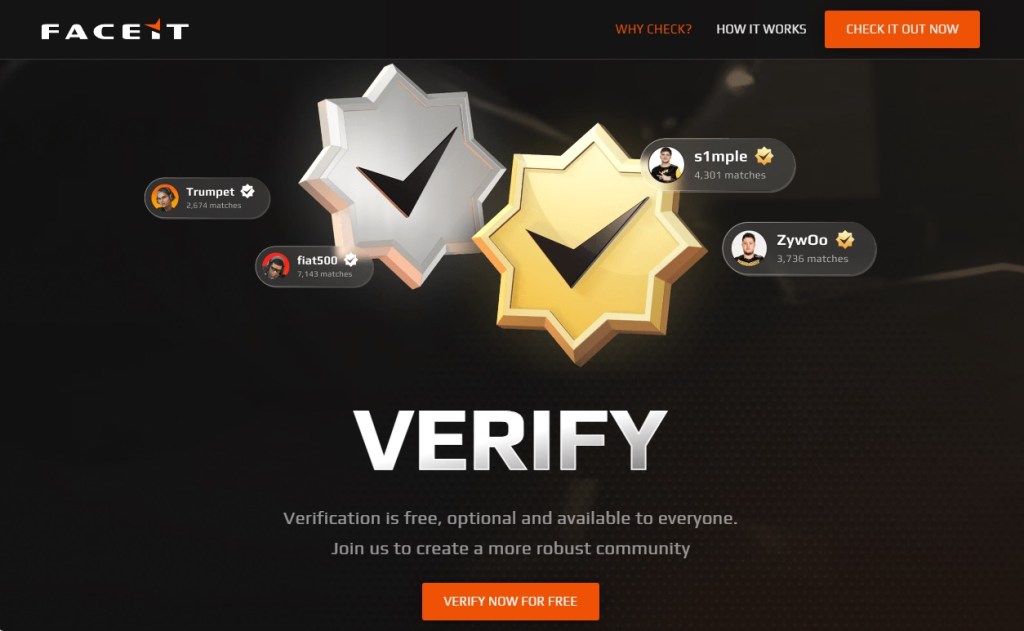Fake FACEIT verification page
Instead of using the official `faceit.com` domain, the scammers use lookalike addresses such as:
* `faceit-discord.com`
* `faceit-clubs-verify.com`
* `faceit-verification-clubs.com`
The extra words like "verification" or "discord," are designed to make these addresses look legitimate at a glance, but they're sites that are controlled by cybercriminals.
Many of these domains are only days or even hours old. Scammers constantly register new ones, knowing they'll likely be blocked eventually. That's why a site not being flagged as dangerous doesn't mean it's safe.
There are small clues, though. In one example, the page listed both "Copyright 2024" and "Copyright 2025." Legitimate companies rarely make mistakes like that, but scam sites often do.
After the verification pitch, the page claims there's a problem with your CS2 account and asks you to update your information to prove you're not a cheater or using a smurf account.
Here's the clever part. The QR code appears blurry and difficult to scan. Researchers believe that's intentional. After a few failed attempts, many users are likely to give up and click the easier-looking **" Sign in through Steam"** button instead.
The broken QR code is the nudge that guides victims toward the part of the page where the real theft happens.
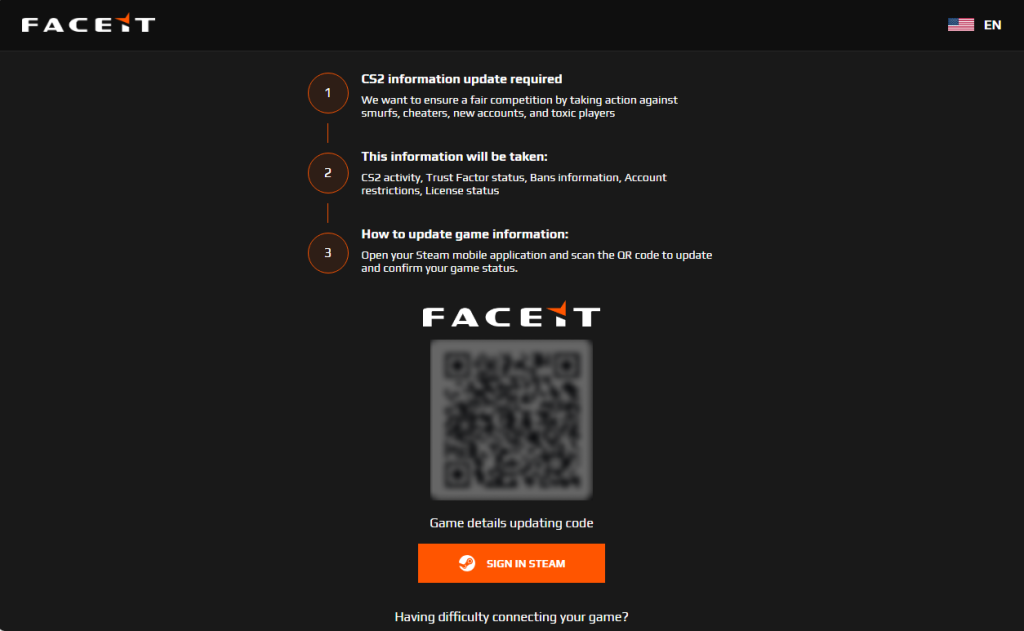Fake FACEIT page with a blurry QR code and "Sign in with Steam" button
When users eventually give up on the QR code and click the button, a Steam login window appears. It looks convincing, complete with the Steam logo, login fields, and what appears to be a `steamcommunity.com` address bar.
But the window is fake.
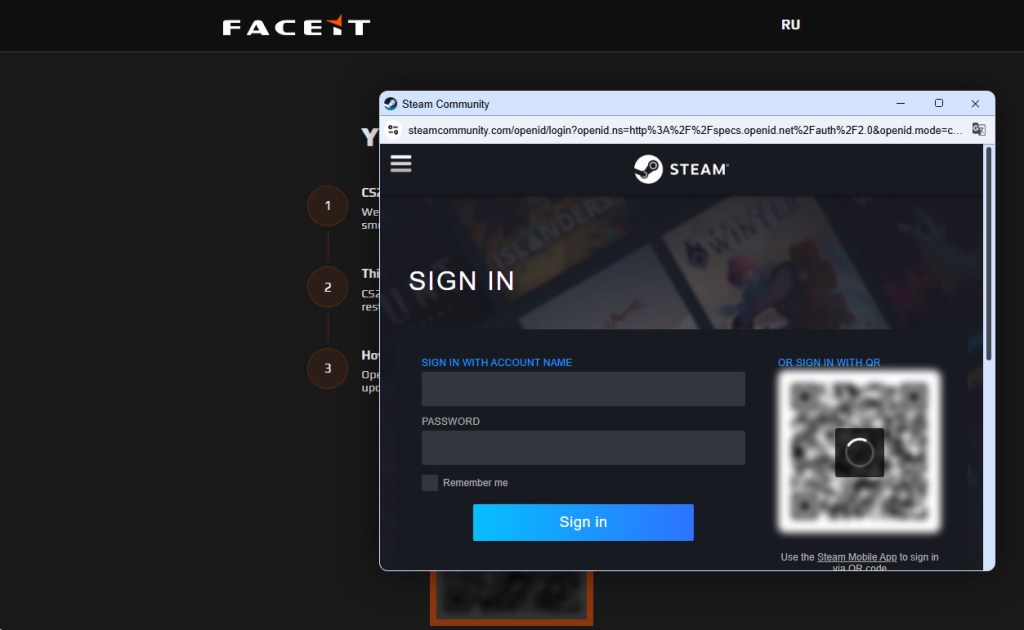Fake Steam sign-in window steals your account details
Instead of opening a real Steam login page, the scammers display a convincing copy inside the website itself. Security researchers call this a Browser-in-the-Browser attack. The fake window looks and behaves like a genuine browser pop-up, but the address bar is just part of the image.
Anything entered into the form goes straight to the criminals. If the page also asks for a Steam Guard code, that gets stolen too, allowing attackers to access the account. Some victims are then tricked into "protecting" their items by transferring them to a friend or backup account, when they're actually sending them directly to the scammers.
## How to protect yourself against this scam
A few simple habits can stop this scam:
* **Check the real address bar.** FACEIT's official website is `faceit.com`. Be wary of lookalike domains such as `faceit-discord.com` or `faceit-clubs-verify.com`. Remember: a login window inside a webpage can fake its own address bar. Trust the one at the top of your browser, not the one inside the page.
* **Be suspicious of blurry QR codes.** Researchers believe the QR code in this scam is deliberately blurred to push users toward the **" Sign in through Steam"** button instead.
* **Treat urgency as a warning sign.** Messages about account problems, verification, or losing access are designed to make you act quickly. Slow down and verify first.
* **Go to the source.** If you're unsure whether FACEIT or Steam needs something from you, open the official website or app yourself rather than following links from Discord, messages, or ads.
* **Add another layer of protection**. Scam sites often look legitimate. Malwarebytes Browser Guard can help block known phishing pages and other online scams before you enter your username and password.
## If you already**entered your details**
Change your Steam password immediately, make sure Steam Guard is enabled, and sign out of all other devices. Check your Steam API key settings and remove any key you don't recognize. Change the password anywhere else you reused it and review your account for unauthorized trades or purchases.
## Why this scam works
This scam works because it doesn't look like a scam. The branding is convincing, the story makes sense, and even the Steam login window appears legitimate.
Most people know to check the address bar before entering a password. Browser-in-the-Browser attacks are designed to defeat that habit. Because the fake Steam window is built into the page itself, the criminals can make its address bar say whatever they want, including `steamcommunity.com`.
The safest approach is to be suspicious of any login window that appears inside another website. If you're unsure, close the page and sign in to Steam the way you normally would, through the official app or by typing the address yourself.
That small pause, that refusal to take the convenient shortcut a page is pushing you toward, is all it takes to keep your account yours.
* * *
**Stop threats before they can do any harm.**
Malwarebytes Browser Guard blocks phishing pages and malicious sites automatically. Free, one click to install. Add it to your browser →
The scam uses fake FACEIT verification pages that look legitimate, complete with official branding, working links, and what appears to be a real Steam login window. By the time it asks for your password, many victims are convinced they're interacting with a genuine service.
The goal is to steal your Steam account.
## **Why this scam targets FACEIT players**
If you're not a competitive gamer, FACEIT might not mean anything to you. But to millions of people, it's a big deal, and that makes it a target for impersonation by cybercriminals.
FACEIT is one of the largest competitive gaming platforms for Counter-Strike 2 (CS2). Millions of players use it for ranked matches, tournaments, leagues, and advanced anti-cheat protections.
To use FACEIT, players typically connect their Steam platform accounts, which are valuable for scammers.
A stolen Steam account can contain:
* Hundreds or thousands of dollars' worth of purchased games
* Valuable CS2 skins and items, some worth significant amounts of real money
* Wallet funds and saved payment methods
* Years of friends, messages, and community reputation
Once criminals gain access, they can steal items, scam friends, or sell the account on criminal marketplaces.
Because FACEIT connects to Steam, a fake "FACEIT verification" page is an easy way to trick people. Victims think they're updating their account, but attackers are really trying to steal Steam accounts that may contain valuable games, skins, and wallet funds. Gamers are especially vulnerable because they're used to linking accounts and following verification steps, and may act quickly if they think their access to a game is at risk.
## How the scam works
The attack starts with a website that looks like an official FACEIT page. The scam pages are likely distributed through the same channels gamers use every day: community forums, chat servers, social media posts, and direct messages.
The page claims FACEIT is offering free, optional identity verification to help build a more trusted community. It's polished, uses the correct branding, and even includes working links to FACEIT's real blog and support pages. Everything about it is designed to make you think you're on a genuine FACEIT website, but you're not.
Fake FACEIT verification page
Instead of using the official `faceit.com` domain, the scammers use lookalike addresses such as:
* `faceit-discord.com`
* `faceit-clubs-verify.com`
* `faceit-verification-clubs.com`
The extra words like "verification" or "discord," are designed to make these addresses look legitimate at a glance, but they're sites that are controlled by cybercriminals.
Many of these domains are only days or even hours old. Scammers constantly register new ones, knowing they'll likely be blocked eventually. That's why a site not being flagged as dangerous doesn't mean it's safe.
There are small clues, though. In one example, the page listed both "Copyright 2024" and "Copyright 2025." Legitimate companies rarely make mistakes like that, but scam sites often do.
After the verification pitch, the page claims there's a problem with your CS2 account and asks you to update your information to prove you're not a cheater or using a smurf account.
Here's the clever part. The QR code appears blurry and difficult to scan. Researchers believe that's intentional. After a few failed attempts, many users are likely to give up and click the easier-looking **" Sign in through Steam"** button instead.
The broken QR code is the nudge that guides victims toward the part of the page where the real theft happens.
Fake FACEIT page with a blurry QR code and "Sign in with Steam" button
When users eventually give up on the QR code and click the button, a Steam login window appears. It looks convincing, complete with the Steam logo, login fields, and what appears to be a `steamcommunity.com` address bar.
But the window is fake.
Fake Steam sign-in window steals your account details
Instead of opening a real Steam login page, the scammers display a convincing copy inside the website itself. Security researchers call this a Browser-in-the-Browser attack. The fake window looks and behaves like a genuine browser pop-up, but the address bar is just part of the image.
Anything entered into the form goes straight to the criminals. If the page also asks for a Steam Guard code, that gets stolen too, allowing attackers to access the account. Some victims are then tricked into "protecting" their items by transferring them to a friend or backup account, when they're actually sending them directly to the scammers.
## How to protect yourself against this scam
A few simple habits can stop this scam:
* **Check the real address bar.** FACEIT's official website is `faceit.com`. Be wary of lookalike domains such as `faceit-discord.com` or `faceit-clubs-verify.com`. Remember: a login window inside a webpage can fake its own address bar. Trust the one at the top of your browser, not the one inside the page.
* **Be suspicious of blurry QR codes.** Researchers believe the QR code in this scam is deliberately blurred to push users toward the **" Sign in through Steam"** button instead.
* **Treat urgency as a warning sign.** Messages about account problems, verification, or losing access are designed to make you act quickly. Slow down and verify first.
* **Go to the source.** If you're unsure whether FACEIT or Steam needs something from you, open the official website or app yourself rather than following links from Discord, messages, or ads.
* **Add another layer of protection**. Scam sites often look legitimate. Malwarebytes Browser Guard can help block known phishing pages and other online scams before you enter your username and password.
## If you already**entered your details**
Change your Steam password immediately, make sure Steam Guard is enabled, and sign out of all other devices. Check your Steam API key settings and remove any key you don't recognize. Change the password anywhere else you reused it and review your account for unauthorized trades or purchases.
## Why this scam works
This scam works because it doesn't look like a scam. The branding is convincing, the story makes sense, and even the Steam login window appears legitimate.
Most people know to check the address bar before entering a password. Browser-in-the-Browser attacks are designed to defeat that habit. Because the fake Steam window is built into the page itself, the criminals can make its address bar say whatever they want, including `steamcommunity.com`.
The safest approach is to be suspicious of any login window that appears inside another website. If you're unsure, close the page and sign in to Steam the way you normally would, through the official app or by typing the address yourself.
That small pause, that refusal to take the convenient shortcut a page is pushing you toward, is all it takes to keep your account yours.
* * *
**Stop threats before they can do any harm.**
Malwarebytes Browser Guard blocks phishing pages and malicious sites automatically. Free, one click to install. Add it to your browser →
Basic Information
ID
MALWAREBYTES:7BE788B42D4CB4CC6F3899E5A9F7C29A
Published
Jun 12, 2026 at 09:27