
Security Update News
Update Information
| Title | Driver of destruction: How a legitimate driver is being used to take down AV processes |
|---|---|
| Update ID | SECURELIST:6945FA20924976F6E3955AA642CFC32D |
| Type | securelist |
| Published | 2025-08-06T10:00:45 |
| Last Updated | 2025-08-06T10:00:45 |
Security Impact
| CVSS Score | 8.7 |
|---|---|
| Severity | HIGH |
Affected CVEs
- CVE-2025-7771
Update Details
## Introduction
In a recent incident response case in Brazil, we spotted intriguing new antivirus (AV) killer software that has been circulating in the wild since at least October 2024. This malicious artifact abuses the `ThrottleStop.sys` driver, delivered together with the malware, to terminate numerous antivirus processes and lower the system’s defenses as part of a technique known as BYOVD (Bring Your Own Vulnerable Driver). AV killers that rely on various vulnerable drivers are a known problem. We have recently seen an uptick in cyberattacks involving this type of malware.
It is important to note that Kaspersky products, such as Kaspersky Endpoint Security (KES), have built-in self-defense mechanisms that prevent the alteration or termination of memory processes, deletion of application files on the hard drive, and changes in system registry entries. These mechanisms effectively counter the AV killer described in the article.
In the case we analyzed, the customer sought our help after finding that their systems had been encrypted by a ransomware sample. The adversary gained access to the initial system, an SMTP server, through a valid RDP credential. They then extracted other users’ credentials with Mimikatz and performed lateral movement using the pass-the-hash technique with Invoke-WMIExec.ps1 and `Invoke-SMBExec.ps1` tools. The attacker achieved their objective by disabling the AV in place on various endpoints and servers across the network and executing a variant of the MedusaLocker ransomware.
In this article, we provide details about the attack and an analysis of the AV killer itself. Finally, we outline the tactics, techniques, and procedures (TTPs) employed by the attackers.
Kaspersky products detect the threats encountered in this incident as:
* Trojan-Ransom.Win32.PaidMeme.* (MedusaLocker variant)
* Win64.KillAV.* (AV killer)
## Incident overview
The attack began using valid credentials obtained by the attacker for an administrative account. The adversary was able to connect to a mail server via RDP from Belgium. Then, using Mimikatz, the attacker extracted the NTLM hash for another user. Next, they used the following PowerShell Invoke-TheHash commands to perform pass-the-hash attacks in an attempt to create users on different machines.
Invoke-WMIExec -Target “
Invoke-SMBExec -Target “
Invoke-SMBExec -Target “
An interesting detail is that the attacker did not want to create the same username on every machine. Instead, they chose to add a sequential number to the end of each username (e.g., User1, User2, User3, etc.). However, the password was the same for all the created users.
Various artifacts, including the AV killer, were uploaded to the `C:\Users\Administrator\Music` folder on the mail server. These artifacts were later uploaded to other machines alongside the ransomware (haz8.exe), but this time to C:\Users\UserN\Pictures. Initially, Windows Defender was able to contain the ransomware threat on some machines right after it was uploaded, but the attacker soon terminated the security solution.
The figure below provides an overview of the incident. We were able to extract evidence to determine the attacker’s workflow and the involved artifacts. Fortunately, the analyzed systems still contained relevant information, but this is not always the case.
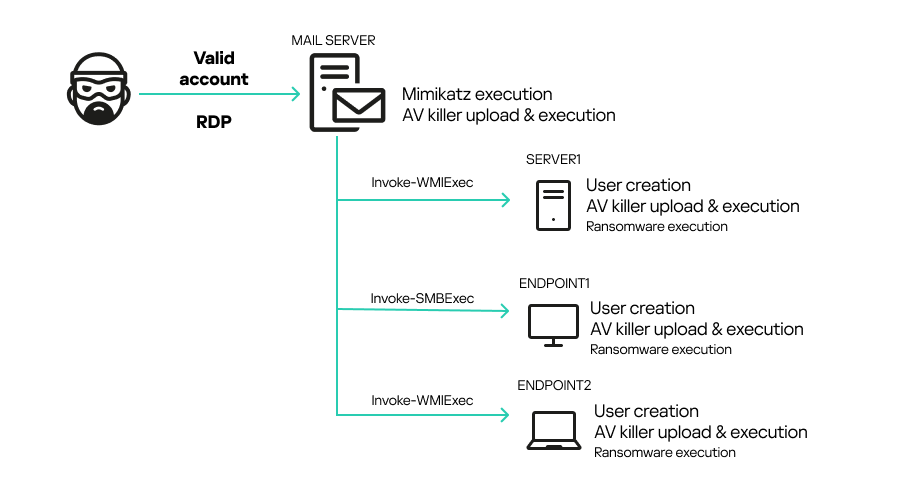
Incident flow
This kind of attack highlights the importance of defense in depth. Although the organization had an AV in place, the attacker was able to use a valid account to upload an undetectable artifact that bypassed the defense. Such attacks can be avoided through simple security practices, such as enforcing the use of strong passwords and disabling RDP access to public IPs.
## The AV killer analysis
To disable the system’s defenses, the attackers relied on two artifacts: `ThrottleBlood.sys` and `All.exe`. The first is a legitimate driver originally called `ThrottleStop.sys`, developed by TechPowerUp and used by the ThrottleStop app. The application is designed to monitor and correct CPU throttling issues, and is mostly used by gamers. The driver involved in the incident has a valid certificate signed on 2020-10-06 20:34:00 UTC, as show below:
Status: The file is signed and the signature was verified
Serial number: 0a fc 69 77 2a e1 ea 9a 28 57 31 b6 aa 45 23 c6
Issuer: DigiCert EV Code Signing CA
Subject: TechPowerUp LLC
TS Serial number: 03 01 9a 02 3a ff 58 b1 6b d6 d5 ea e6 17 f0 66
TS Issuer: DigiCert Assured ID CA-1
TS Subject: DigiCert Timestamp Responder
Date Signed: 2020-10-06 20:34:00 UTC
**Hash** | **Value**
—|—
MD5 | 6bc8e3505d9f51368ddf323acb6abc49
SHA-1 | 82ed942a52cdcf120a8919730e00ba37619661a3
SHA-256 | 16f83f056177c4ec24c7e99d01ca9d9d6713bd0497eeedb777a3ffefa99c97f0
When loaded, the driver creates a device at `.\\.\\ThrottleStop`, which is a communication channel between user mode and kernel mode.
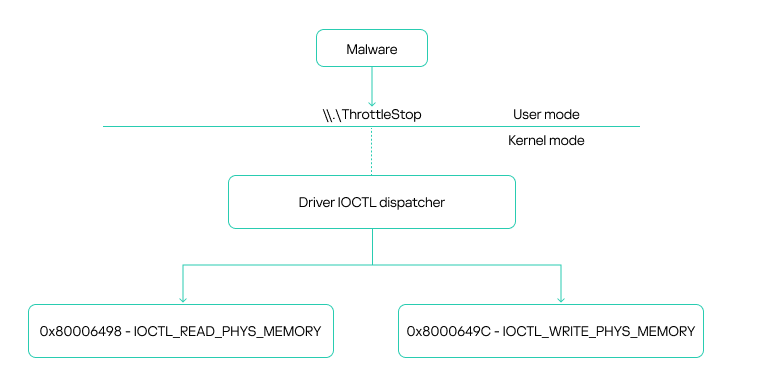
ThrottleStop device driver communication overview
Communication with the driver is carried out via IOCTL calls, specifically using the Win32 `DeviceIoControl` function. This function enables the use of IOCTL codes to request various driver operations. The driver exposes two vulnerable IOCTL functions: one that allows reading from memory and another that allows writing to it. Both functions use physical addresses. Importantly, any user with administrative privileges can access these functions, which constitutes the core vulnerability.
The driver leverages the MmMapIoSpace function to perform physical memory access. This kernel-level API maps a specified physical address into the virtual address space, specifically within the MMIO (memory-mapped I/O) region. This mapping enables reads and writes to virtual memory to directly affect the corresponding physical memory. This type of vulnerability is well-known in kernel drivers and has been exploited for years, not only by attackers but also by game cheaters seeking low-level memory access. The vulnerability in ThrottleStop.sys has been assigned CVE-2025-7771. According to our information, the vendor is currently preparing a patch. In the meantime, we recommend that security solutions monitor for the presence of this known vulnerable driver in the operating system to help prevent exploitation by EDR killers like the one described in this article.
The second artifact, All.exe, is the AV killer itself. Our analysis began with a basic inspection of the file.
**Hash** | **Value**
—|—
MD5 | a88daa62751c212b7579a57f1f4ae8f8
SHA-1 | c0979ec20b87084317d1bfa50405f7149c3b5c5f
SHA-256 | 7a311b584497e8133cd85950fec6132904dd5b02388a9feed3f5e057fb891d09
First, we inspected its properties. While searching for relevant strings, we noticed a pattern: multiple antivirus process names inside the binary. The following image shows an excerpt of our query.
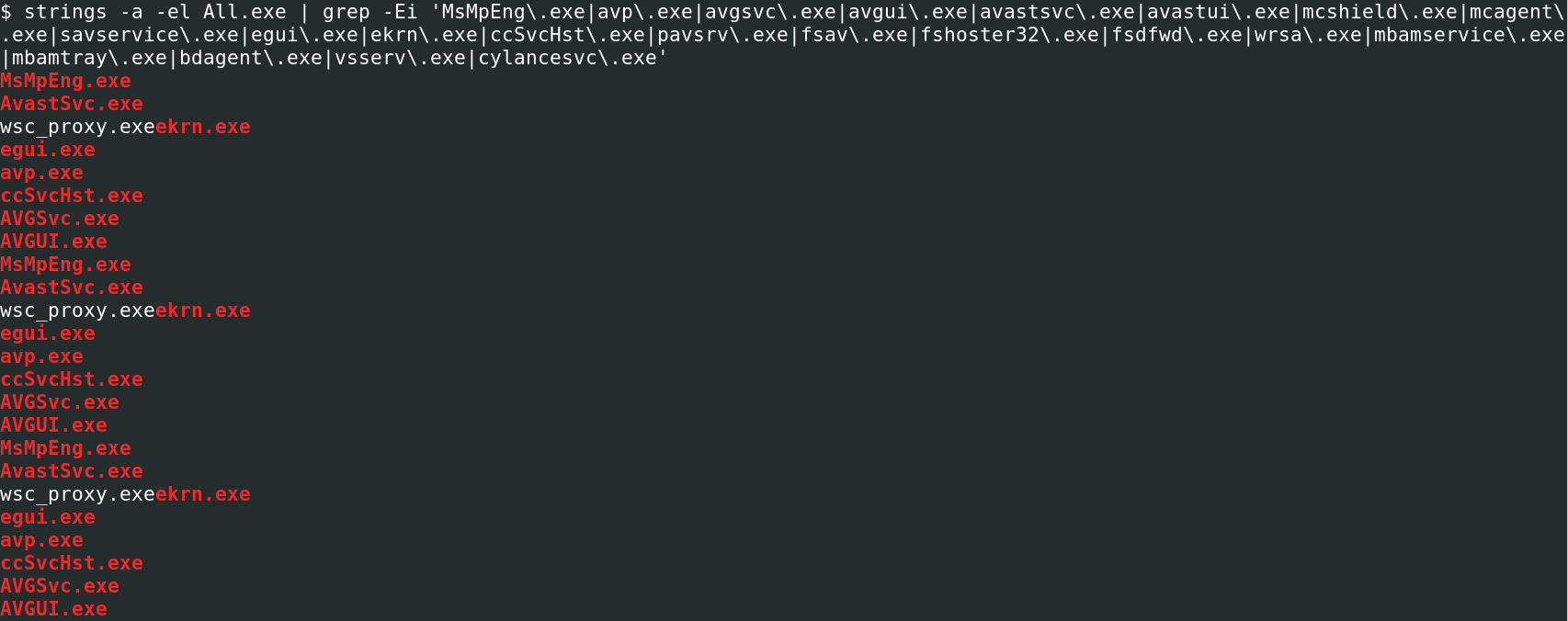
AV names inside the binary
We were able to map all the processes that the malware tries to kill. The table below shows each one of them, along with the corresponding vendor. As we can see, the artifact attempts to kill the main AV products on the market.
**Process names** | **Vendor**
—|—
AvastSvc.exe, AvLaunch.exe, aswToolsSvc.exe, afwServ.exe, wsc_proxy.exe, bccavsvc.exe | Avast
AVGSvc.exe, AVGUI.exe, avgsvca.exe, avgToolsSvc.exe | AVG Technologies (Avast)
bdlived2.exe, bdredline.exe, bdregsvr2.exe, bdservicehost.exe, bdemsrv.exe, bdlserv.exe, BDLogger.exe, BDAvScanner.exe, BDFileServer.exe, BDFsTray.exe, Arrakis3.exe, BDScheduler.exe, BDStatistics.exe, npemclient3.exe, epconsole.exe, ephost.exe, EPIntegrationService.exe, EPProtectedService.exe, EPSecurityService.exe, EPUpdateService.exe | BitDefender
CSFalconContainer.exe, CSFalconService.exe, CSFalconUI.exe | CrowdStrike
egui.exe, eguiProxy.exe, ERAAgent.exe, efwd.exe, ekrn.exe | ESET
avp.exe, avpsus.exe, avpui.exe, kavfs.exe, kavfswh.exe, kavfswp.exe, klcsldcl.exe, klnagent.exe, klwtblfs.exe, vapm.exe | Kaspersky
mfevtps.exe | McAfee (Trellix)
MsMpEng.exe, MsMpSvc.exe, MSASCui.exe, MSASCuiL.exe, SecurityHealthService.exe, SecurityHealthSystray.exe | Microsoft
QHPISVR.EXE, QUHLPSVC.EXE, SAPISSVC.EXE | Quick Heal Technologies
ccSvcHst.exe, ccApp.exe, rtvscan.exe, SepMasterService.exe, sepWscSvc64.exe, smc.exe, SmcGui.exe, snac.exe, SymCorpUI.exe, SymWSC.exe, webextbridge.exe, WscStub.exe | Symantec (Broadcom)
PSANHost.exe, pselamsvc.exe, PSUAMain.exe, PSUAService.exe | Panda Security (WatchGuard)
SentinelAgent.exe, SentinelAgentWorker.exe, SentinelHelperService.exe, SentinelServiceHost.exe, SentinelStaticEngine.exe, SentinelStaticEngineScanner.exe, SentinelUI.exe | SentinelOne
SophosFileScanner.exe, SophosFIMService.exe, SophosFS.exe, SophosHealth.exe, SophosNetFilter.exe, SophosNtpService.exe, hmpalert.exe, McsAgent.exe, McsClient.exe, SEDService.exe | Sophos
When the binary is executed, it first loads the `ThrottleBlood.sys` driver using Service Control Manager (SCM) API methods, such as `OpenSCManagerA()` and `StartServiceW()`.
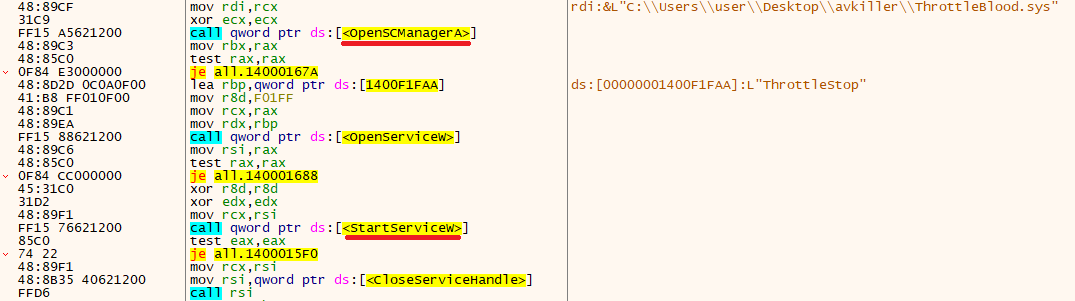
ThrottleStop/ThrottleBlood driver loading process
The AV killer needs the ThrottleStop driver to hijack kernel functions and enable the execution of kernel-mode-only routines from user mode. To invoke these kernel functions using the driver’s vulnerable read/write primitives, the malware first retrieves the base address of the currently loaded kernel and the addresses of the target functions to overwrite. It achieves this by utilizing the undocumented `NtQuerySystemInformation` function from Win32.
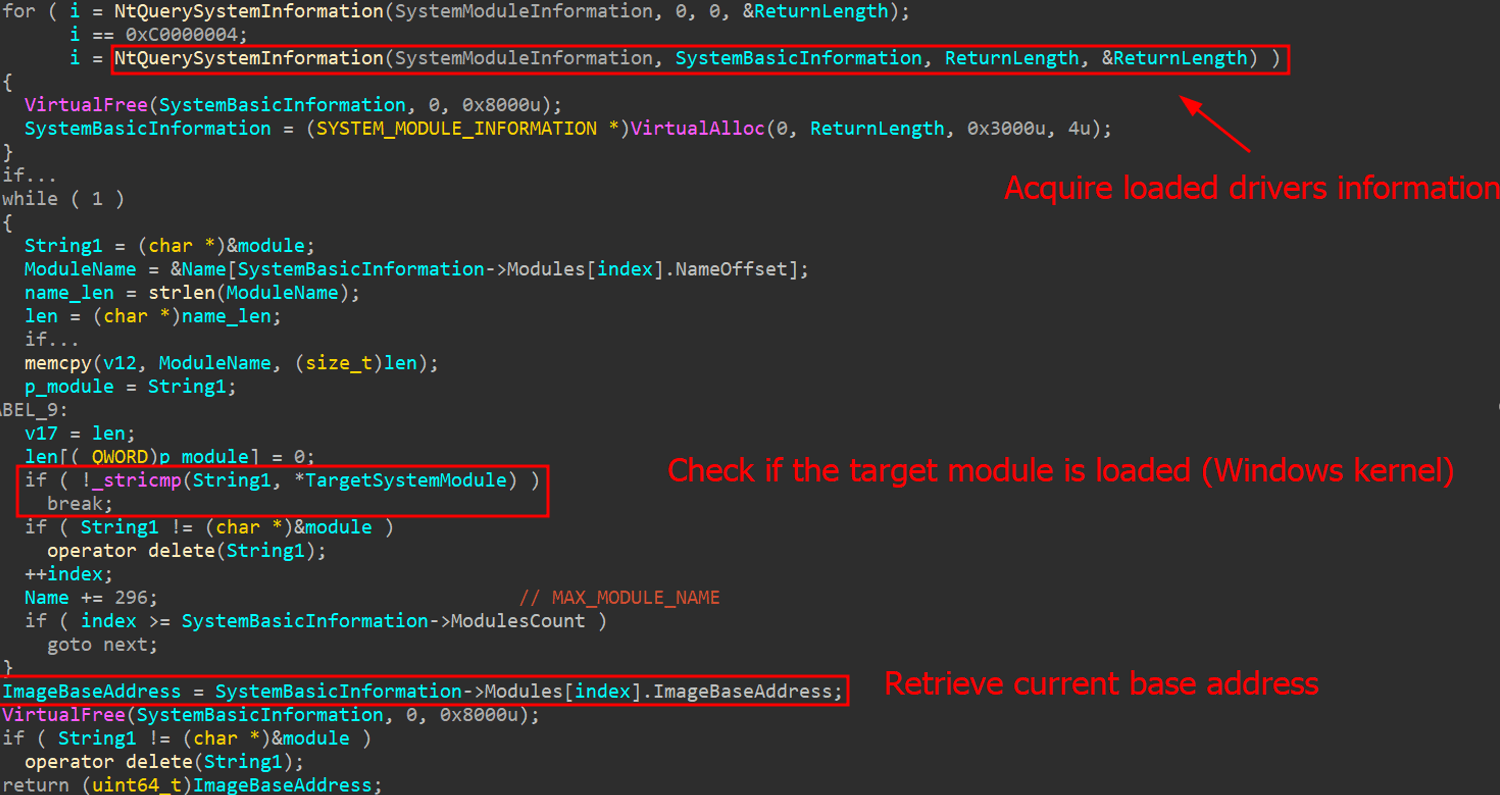
Kernel base address gathering
Passing the `SystemModuleInformation` flag allows the function to return the list of loaded modules and drivers on the current system. The Windows kernel is referred to as `ntoskrnl.exe`. The base address is always different because of KASLR (Kernel Address Space Layout Randomization).
To perform `read/write` operations using `MmMapIoSpace`, the system must first determine the physical address used by the kernel. This is achieved using a technique called `SuperFetch`, which is packed in the open-source superfetch project available on GitHub. This project facilitates the translation of virtual addresses to physical addresses through a C++ library composed solely of header files.
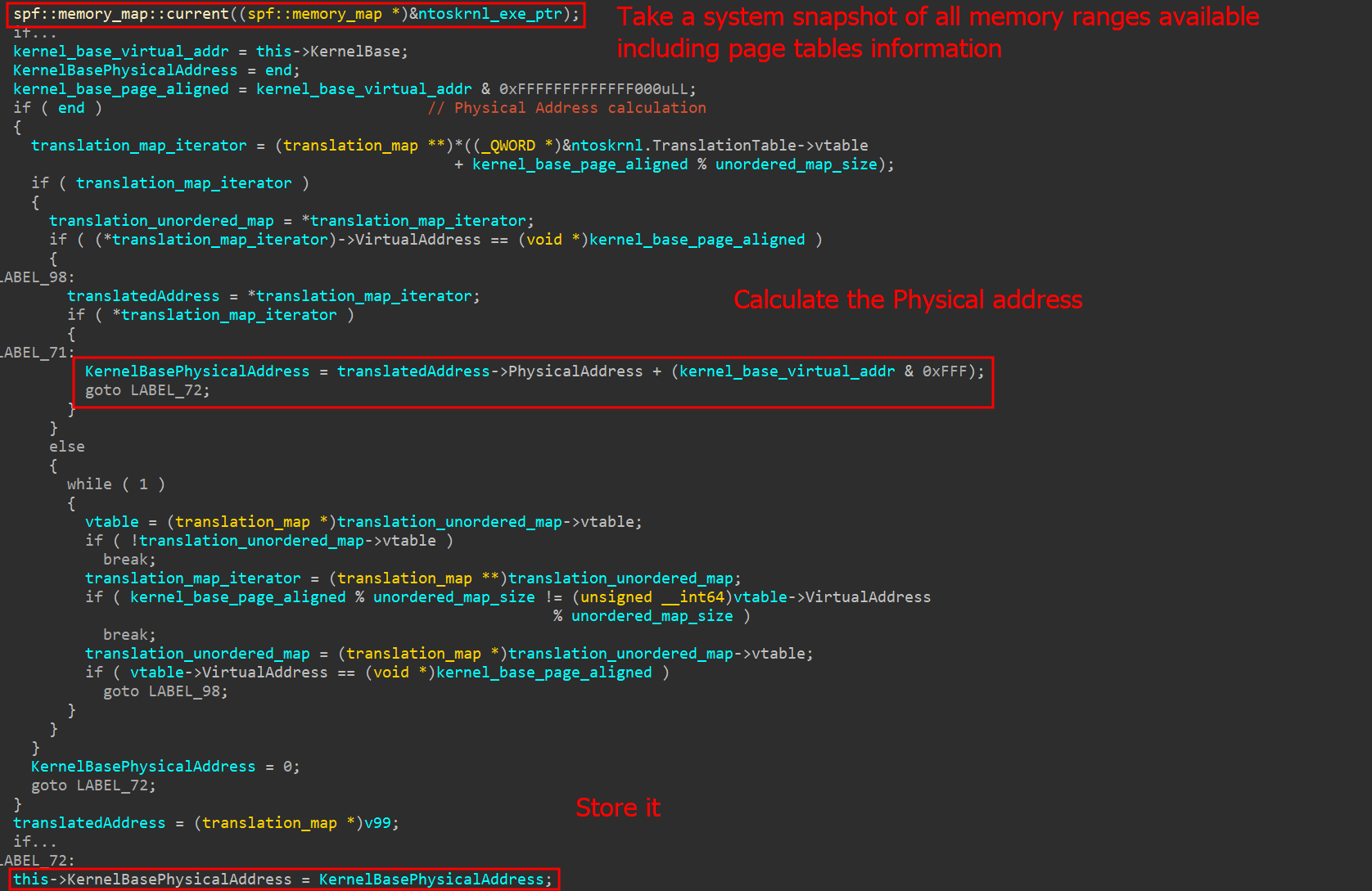
Physical address calculation
The superfetch C++ library makes use of the `NtQuerySystemInformation` function, specifically using the `SystemSuperfetchInformation` query. This query returns all current memory ranges and their pages. With this information, the superfetch library can successfully translate any kernel virtual address to its respective physical address.
### Calling kernel functions
Now that the physical base address has been collected, the malware must choose a kernel function that can be indirectly called by a system call (from user mode). The chosen syscall is `NtAddAtom`, which is rarely used and easily callable through `ntdll.dll`.
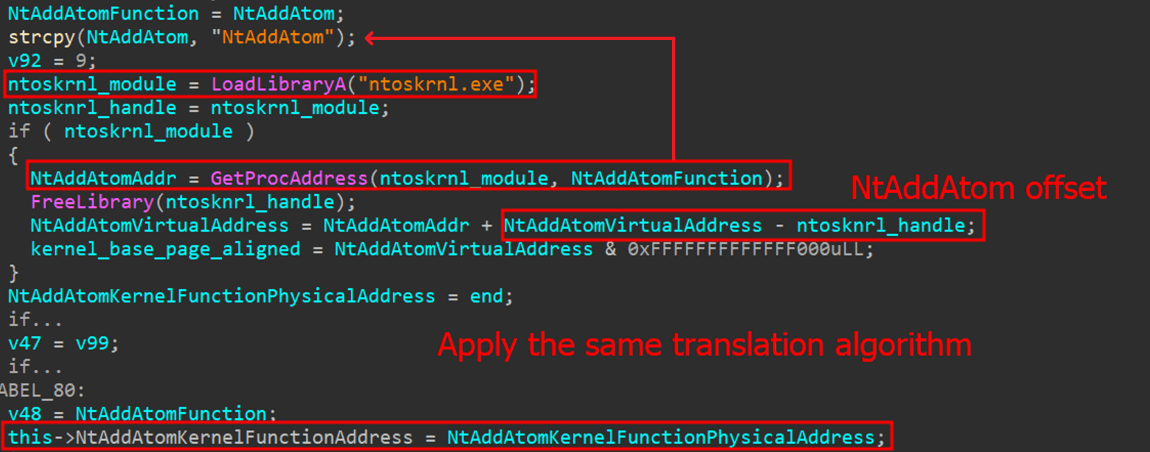
NtAddAtom address collection
By loading `ntoskrnl.exe` with the `LoadLibrary` function, the malware, among other things, can easily discover the offset of the `NtAddAtom` function and thus determine its kernel address by adding the current base address and the offset. The physical address is obtained in the same way as the kernel base. With the physical addresses and driver loaded, the malware can exploit the vulnerable IOCTL codes to read and write the physical memory of the `NtAddAtom` function.
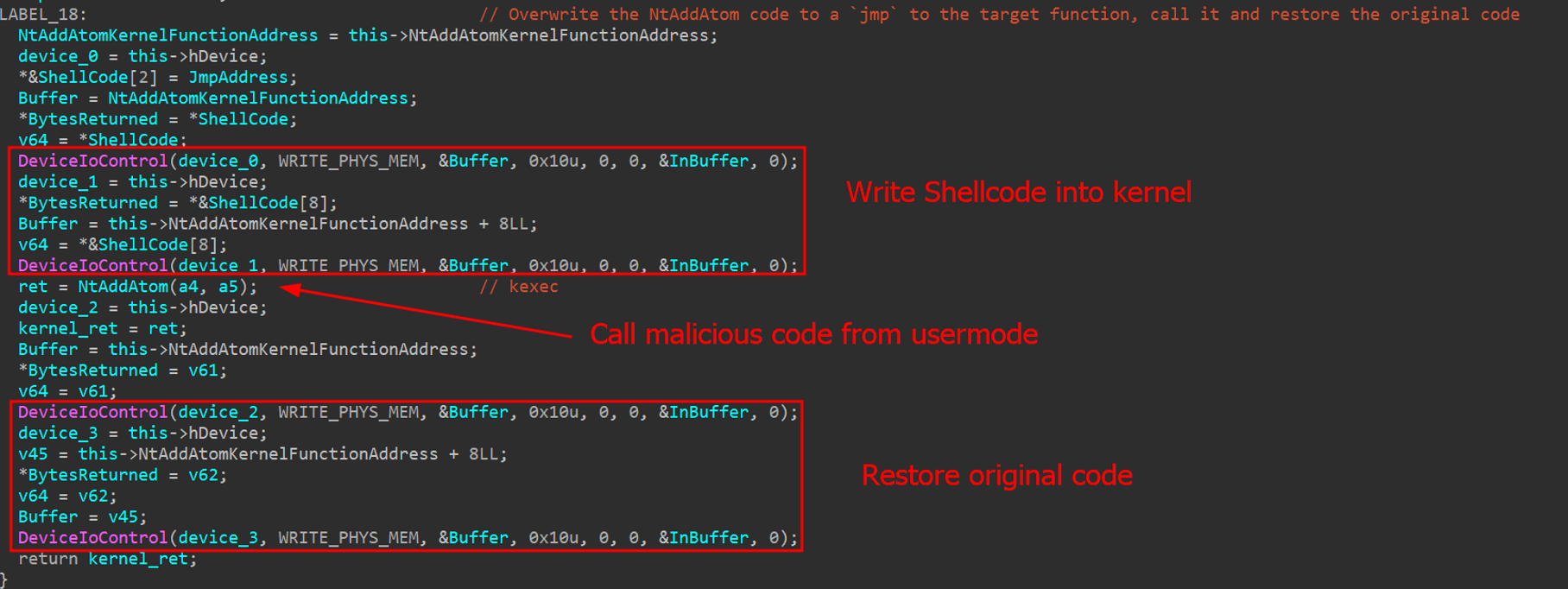
Kernel code injection using vulnerable driver
To call any kernel function, the AV killer writes a small shellcode that jumps to a target address within the kernel. This target address can be any desired kernel function. Once the function completes, the malware restores the original kernel code to prevent system crashes.
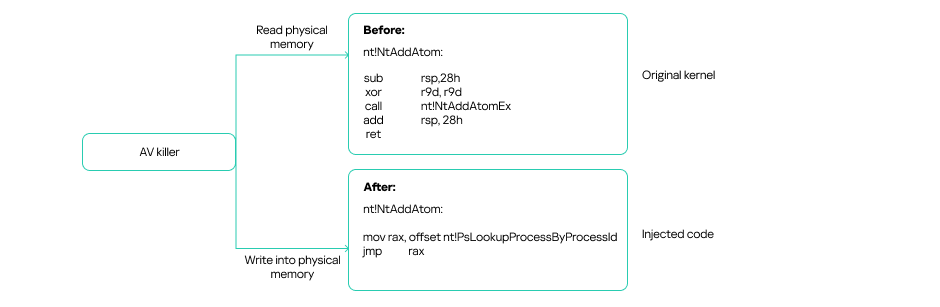
Kernel code injection diagram
### Process killer main routine
Having obtained all the necessary information, the AV killer starts a loop to find target processes using the `Process32FirstW()` and `Process32NextW API` calls. As we mentioned earlier, the list of target security software, such as `MsMpEng.exe` (Windows Defender), is hardcoded in the malware.
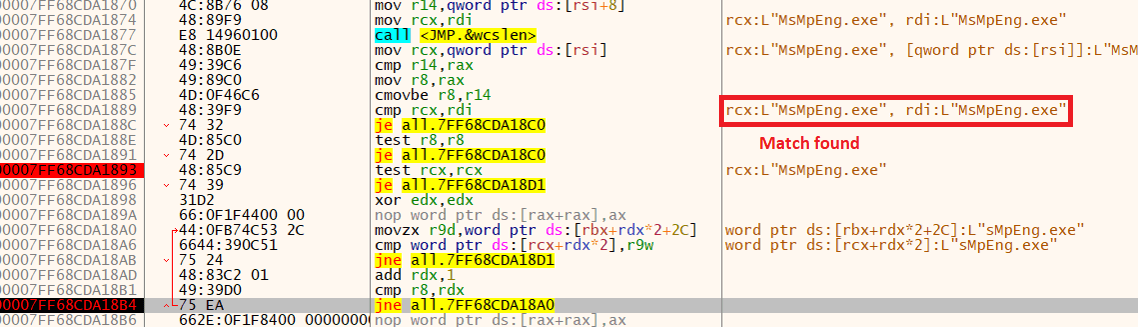
MsMpEng.exe match found
The AV killer checks all running processes against the hardcoded list. If any match, it kills them by using the vulnerable driver to call the `PsLookupProcessById` and `PsTerminateProcess` kernel functions.
If a process is killed, a message indicating this, along with the name of the process, is displayed in the console, as depicted in the following image. This suggests that the malware was being debugged.
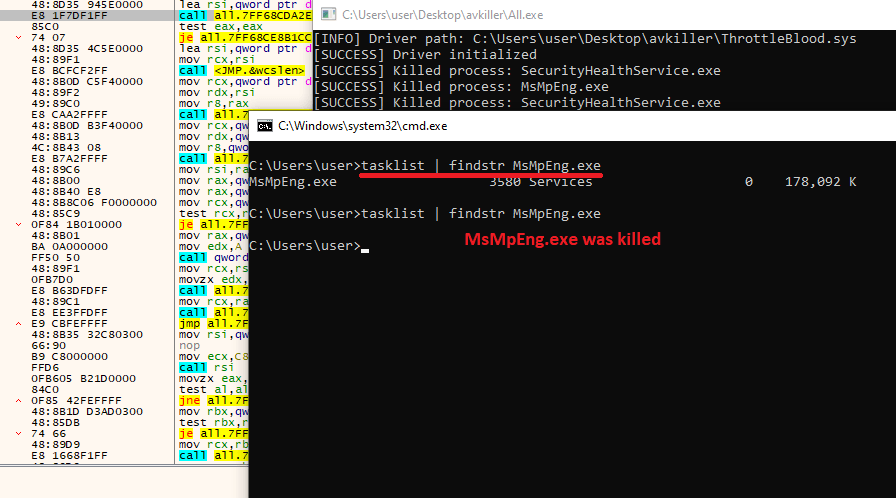
MsMpEng.exe was killed
Like most antivirus software available today, Windows Defender will attempt to restart the service to protect the machine. However, the main loop of the program will continue to identify and kill the associated AV process.
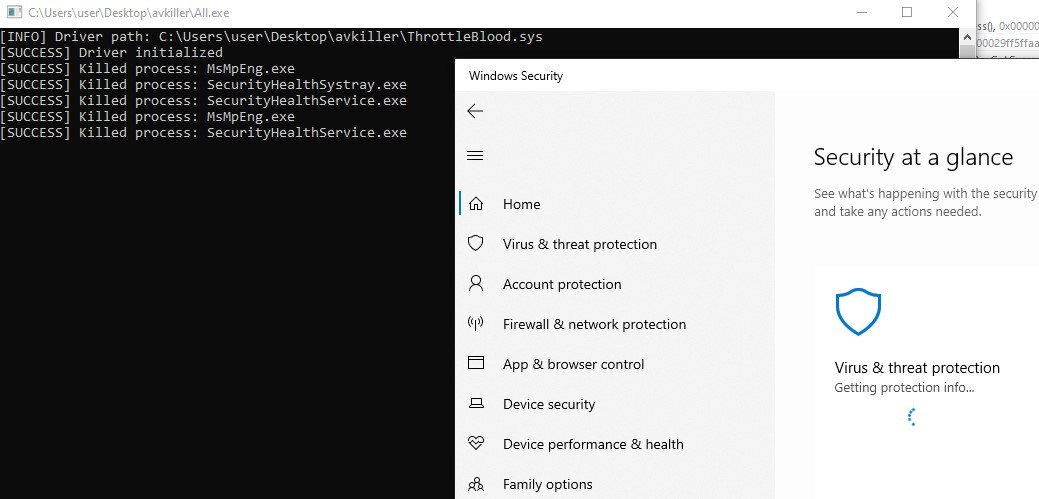
Defender tries to restart, but is killed again
## YARA rule
Based on our analysis of the sample, we developed the following YARA rule to detect the threat in real time. The rule considers the file type, relevant strings (most of which are related to AV processes), and library function imports.
import “pe”
rule AVKiller_MmMapIoSpace {
meta:
description = “Rule to detect the AV Killer”
author = “Kaspersky”
copyright = “Kaspersky”
version = “1.0”
last_modified = “2025-05-14”
hash = “a88daa62751c212b7579a57f1f4ae8f8”
strings:
$shellcode_template = {4? BA 00 00 40 75 00 65 48 8B}
$ntoskrnl = “ntoskrnl.exe”
$NtAddAtom = “NtAddAtom”
$ioctl_mem_write = {9C 64 00 80}
$ioctl_mem_read = {98 64 00 80}
condition:
pe.is_pe and
pe.imports(“kernel32.dll”, “DeviceIoControl”)
and all of them
}
## Victims
Based on our telemetry and information collected from public threat intelligence feeds, adversaries have been using this artifact since at least October 2024. The majority of affected victims are in Russia, Belarus, Kazakhstan, Ukraine, and Brazil.
## Attribution
This particular AV killer tool was recently used in an attack in Brazil to deploy MedusaLocker ransomware within a company’s infrastructure. However, this type of malware is common among various threat actors, including various ransomware groups and affiliates.
## Conclusion and recommendations
This incident offers several valuable lessons. First, that strong hardening practices must be implemented to protect servers against brute‑force attacks and restrict public exposure of remote‑access protocols. Had the victim limited RDP access and enforced robust password policies, the initial breach could have been prevented. Furthermore, this incident underscores the necessity of defense in depth. The AV killer was able to disable the system’s defenses, allowing the attacker to move laterally across machines with ease. To mitigate such threats, system administrators should implement the following mechanisms:
* Application whitelisting and strict enforcement of least‑privilege access.
* Network segmentation and isolation to contain breaches and limit lateral movement.
* Multi‑factor authentication (MFA) for all remote‑access channels.
* Regular patch management and automated vulnerability scanning.
* Intrusion detection and prevention systems (IDS/IPS) to identify anomalous behavior.
* Endpoint detection and response (EDR) tools for real‑time monitoring and remediation.
* Comprehensive logging, monitoring, and alerting to ensure rapid incident detection.
* Periodic security assessments and penetration testing to validate the effectiveness of controls.
Recently, we have seen an increase in attacks involving various types of AV killer software. Threat protection services should implement self-defense mechanisms to prevent these attacks. This includes safeguarding application files from unauthorized modification, monitoring memory processes, and regularly updating detection rules on customers’ devices.
## Tactics, techniques and procedures
The TTPs identified from our malware analysis for the AV killer are listed below.
**Tactic** | **Technique** | **ID**
—|—|—
Discovery | Process Discovery | T1057
Defense Evasion | Impair Defenses: Disable or Modify Tools | T1562.001
Defense Evasion | Impair Defenses: Indicator Blocking | T1562.006
Privilege Escalation | Create or Modify System Process: Windows Service | T1543.003
Impact | Service Stop | T1489
## Indicators of compromise
**Vulnerable ThrottleBlood.sys driver**
82ed942a52cdcf120a8919730e00ba37619661a3
**Malware observed in the incident**
f02daf614109f39babdcb6f8841dd6981e929d70 (haz8.exe)
c0979ec20b87084317d1bfa50405f7149c3b5c5f (All.exe)
**Other AV killer variants**
eff7919d5de737d9a64f7528e86e3666051a49aa
0a15be464a603b1eebc61744dc60510ce169e135
d5a050c73346f01fc9ad767d345ed36c221baac2
987834891cea821bcd3ce1f6d3e549282d38b8d3
86a2a93a31e0151888c52dbbc8e33a7a3f4357db
dcaed7526cda644a23da542d01017d48d97c9533